Core Solutions · Procurement Planning & Budgeting

Internal Budgeting System

Plan, approve, allocate and control the government budget on one platform. The Internal Budgeting System replaces spreadsheets and paper routing with a governed digital workflow, from the first departmental need to the final allocation and year-round spending control.

Five white modules connected by glowing cyan lines to a central dark core on a slate surface
6Governed budget lifecycle stages
4Architecture layers on Azure and Power Platform
3Editions, from fiscal foundation to cognitive AI
Overview

One fiscal platform from needs planning to spending control

Legacy budgeting runs on siloed ledgers, manual consolidation and static forecasts. The Internal Budgeting System replaces paper document cycles, disconnected spreadsheet estimates and manual reconciliation with a fully automated digital workflow. Allocations move faster and stay tied to institutional objectives and statutory requirements.

The system works as a native extension of your existing Enterprise Resource Planning (ERP) environment. Microsoft Dataverse gives every budget figure a single, secure source of truth. Power Apps, Power Automate and Power BI run the workflows and dashboards, while Azure Data Lake Gen2 and Azure Synapse Analytics store and process the data behind them. Azure provides enterprise-grade security, high availability and compliance with national data sovereignty requirements.

The solution also centralizes annual procurement planning. It automates the manual yearly planning tasks, gives management clear visibility into planned spending, and frees finance and planning teams for strategic work. With Azure OpenAI and machine learning, budgeting moves from historical record-keeping to predictive and prescriptive fiscal intelligence.


DG365 Budgeting solution emblem
Architectural evolution

From fragmented ledgers to one Azure-driven fiscal platform

Public financial management is moving from decentralized legacy tools to a centralized cloud architecture that combines a data lake, automation and AI-driven analytics.

Before

Legacy systems

Decentralized, manual and static.

  • Spreadsheets
  • Isolated databases
  • Manual workflows
  • Static forecasts
After

Azure-driven cloud architecture

Centralized, automated and predictive.

  • Azure Data Lake: one governed data store
  • Power Automate: digital approval workflows
  • Power BI: live fiscal dashboards
  • Azure OpenAI: predictive and generative AI
Design principles

Four pillars shape every budget decision

Continuous compliance

Automated controls embedded in the user interface keep every entry aligned with national accounting frameworks and statutory financial regulations.

Deep automation

Multi-stage Power Automate workflows remove manual data entry and hierarchical approval bottlenecks.

Radical transparency

Real-time visibility of the budget lifecycle, from the initial needs assessment to the final executive authorization.

Built-in integration

A module of the wider enterprise directory, with unified single sign-on and data exchange across government departments.

Who it is for

Built for every tier of government

During annual budget planning, the procurement and planning department of a government organization collects procurement requirements from its departments and sections. Each request must be segmented by budget account, contracting type, funding source and more.

The department then consolidates these requests and submits a single budget request to the Ministry of Finance, or to other bodies such as specialized government authorities, for review and approval. Once approved, the budget must be redistributed to the requesting departments' accounts so that procurement can be tracked throughout the fiscal year.

The Internal Budgeting System automates this collection, consolidation and reporting process and extends it to allocating approved amounts to departments and sectors. It also integrates with the Government Procurement (eTendering) solution to give you visibility into, and control over, spending performance.

  • Government ministries and central finance authorities
  • Sovereign wealth funds
  • Large public institutions running complex, multi-departmental fiscal operations
  • Municipal and local government agencies beginning their digital transformation
Use cases

Three problems of the fiscal cycle, solved in one workflow

The solution addresses the realities of entities that must balance rapid budget execution with strict legislative adherence and public accountability.

Budget formulation and needs planning

Self-service portals linked to the unified chart of accounts standardize the needs planning phase. Every departmental funding request is categorized, financially justified and aligned with allowable expenditure types before it reaches central consolidation.

Multi-departmental consolidation and review

The platform tabulates local requirements by accounting item and aggregates them into departmental and ministerial budget projects. Requests follow pre-defined hierarchical paths, so directors and financial controllers validate, adjust or reject line items before escalation to the central finance authority.

Fiscal reconciliation and continuous monitoring

Once the central authority approves the final budget, an automated settlement adjusts all departmental plans to the funded ceilings. From then on, no financial commitment can start without verified financial cover.

Who uses it

One system for everyone who touches the budget

Financial professionals get deep analytical tools. Non-financial staff get guided, self-service screens that hide accounting complexity and help preserve institutional knowledge as experienced civil servants retire.

Department heads and program managers

Work mainly in the needs planning modules. Submit annual funding requirements with configurable templates, justify program spending, track request status and manage allocations against approved limits, with AI virtual assistants for workflow guidance and policy interpretation.

Budget officers and financial controllers

The gateway between operational requests and strategic limits. Review consolidated departmental budgets, filter by fiscal year, program and sub-accounting item, enforce taxonomy compliance and spending limits, and run ongoing variance analysis to prevent deficit spending.

Central finance authority and ministry executives

Set macroeconomic parameters, issue top-down spending limits, approve the final institutional budget project and monitor fiscal health through aggregated dashboards and standardized reports for legislative and executive review.

Strategic planners and macroeconomists

Use data lakes, machine learning, what-if scenario simulators and natural language tools to run predictive models, forecast long-term revenue and assess the fiscal impact of economic shocks and policy shifts.

Internal auditors and compliance teams

Use tamper-proof audit trails for retrospective compliance reviews, verify segregation of duties and conduct forensic analysis of budget transactions.

Value by persona

Each role draws on the capabilities it needs most

The platform's four primary functions map to the strategic and operational needs of each government stakeholder.

PersonaWorkflow automationTaxonomy complianceReal-time reconciliationPredictive AI
Department headsNeeds planning and program spendingPrimary useSecondary useLow / not applicableLow / not applicable
Budget officersReview, compliance and variance analysisPrimary usePrimary usePrimary useSecondary use
Central financeCeilings, final approval and fiscal healthSecondary usePrimary usePrimary usePrimary use
Strategic plannersForecasting and scenario modelingLow / not applicableSecondary useSecondary usePrimary use
Business benefits

Faster budget cycles with control at the point of origin

Preventive financial control

No hiring request, program expansion or expenditure reservation can start unless it is tied to a pre-approved budget line with sufficient funds. Unauthorized commitments are blocked at the point of origin.

Accelerated budget cycles

Automated multi-level approvals replace paper routing and email negotiation, cutting preparation and approval timelines from weeks to days with full procedural compliance.

Continuous fiscal visibility

Interactive dashboards show utilization, commitment rates and variances as they happen. Oversight moves from end-of-year audits to continuous monitoring.

Stronger compliance and auditability

Every budget action is permanently logged in a tamper-proof audit trail with full non-repudiation. Automatic coding to the national chart of accounts simplifies regulatory audits.

Spending aligned with strategy

Track spending and forecast expenses within strict constraints, so savings are identified and funds go to organizational priorities, including underfunded groups and regions.

Economic resilience

What-if scenarios show how inflation, supply chain disruption or demographic shifts would affect obligations. Machine learning forecasts are reported to reduce forecast errors by 30 to 40 percent compared with traditional econometric models.

No more data silos

Native bidirectional synchronization with ERP systems reflects allocations, commitments and expenditures across all departmental records, eliminating manual reconciliation.

Lower operating costs

Automating repetitive budget tasks reduces administrative overhead and redirects finance professionals from manual data entry to strategic analysis.

Priority-based budgeting

AI maps every request to the outcomes it is meant to fund

Budgets often roll forward last year's allocations with marginal adjustments. Priority-based budgeting uses natural language processing and machine learning to test each request against program goals and historical execution data, so leaders can see whether allocations reflect their stated priorities.

Inputs

Policy goals

Weighted strategic priorities, program goals and community needs.

Fiscal data

Historical spending and budget execution data.

Budget requests

Departmental requests and their narratives.

AI analytics engineNLP maps requests to priorities
  • Azure OpenAI
  • Machine learning
Outcomes

Optimized allocation

Funds directed to the highest-impact areas, such as infrastructure, education or healthcare.

Reallocation recommendations

Suggested shifts that surface hidden efficiencies.

The AI-driven process analyzes historical spending and strategic community goals to optimize future public sector resource allocation.

Budget lifecycle

Six governed stages, from preparation to amendment

Every budget follows the same controlled workflow, with each stage recorded for audit.

01

Preparation

Departments build their budgets with configurable templates and allocations, coded to the chart of accounts as they are entered.

02

Review

Proposals are routed through multi-level approval, with notifications, bottleneck tracking and time-bound service levels for each review.

03

Approval

Executive leadership signs off the consolidated budget, and the system produces the standard forms required by the Ministry of Finance or other oversight bodies.

04

Execution

Commitments are tracked against approved allocations and blocked when financial cover is insufficient.

05

Monitoring

Real-time analytics show utilization, commitments, burn rate and variances.

06

Amendments

Transfers and changes are processed through governed workflows.

Streamlined process

How the annual budget request comes together

Collecting procurement needs for the next fiscal year is a collaborative process that reaches deep into the organization structure. Every organizational unit submits its own itemized budget requests, on one shared timetable, in four steps.

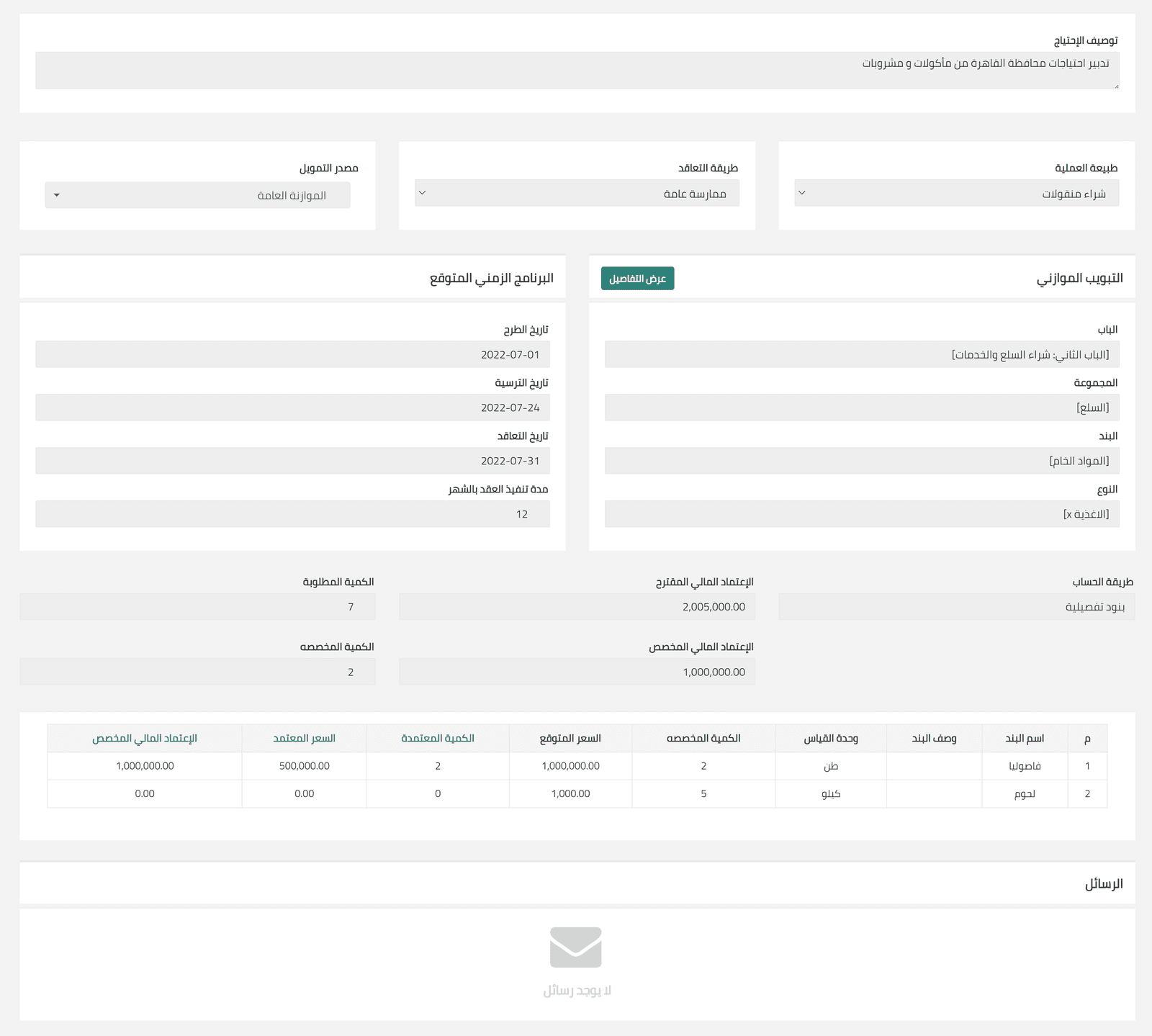
1. Departments submit their budget needs to the parent unit

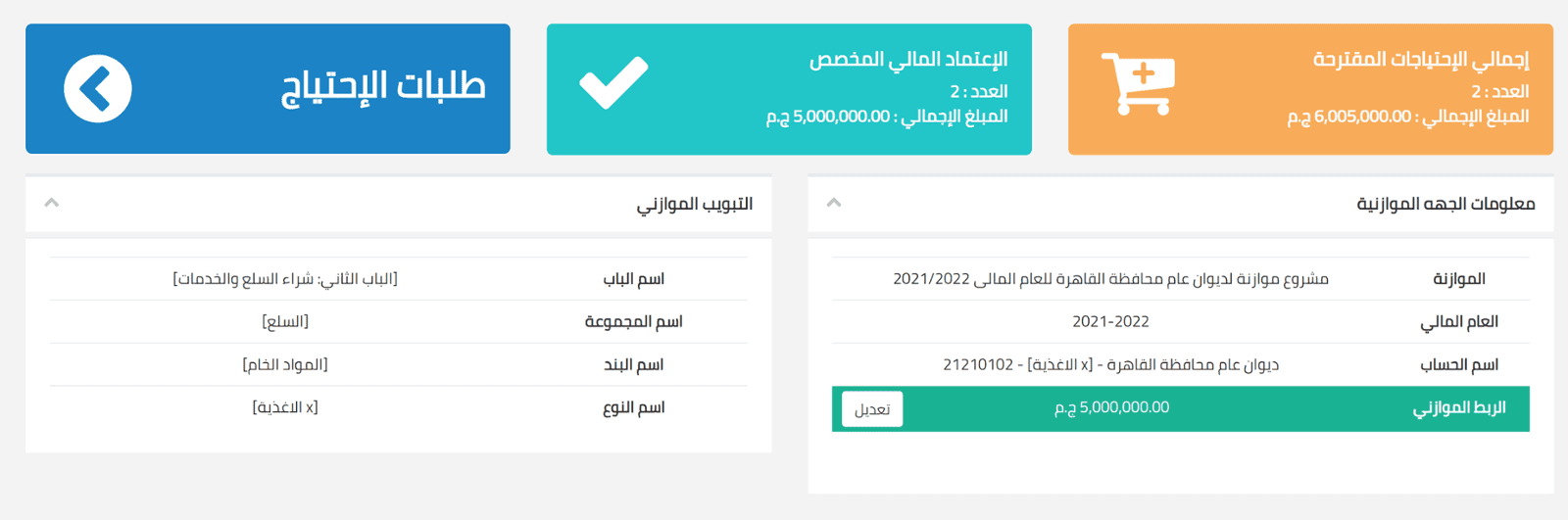
Each department (subsidiary unit) and sector submits a budget request, or need, for the next fiscal year. The system classifies each need under its budget account and aggregates it by department and sector. Each request profiles a procurement need for a service or commodity and captures:

  • Procurement type
  • Funding source
  • Budget account
  • Budget bill of quantities (BOQ)
  • Planning team information
  • Related correspondence and messages
Department budget need submission form with budget classification, expected timeline and line items (Arabic interface)

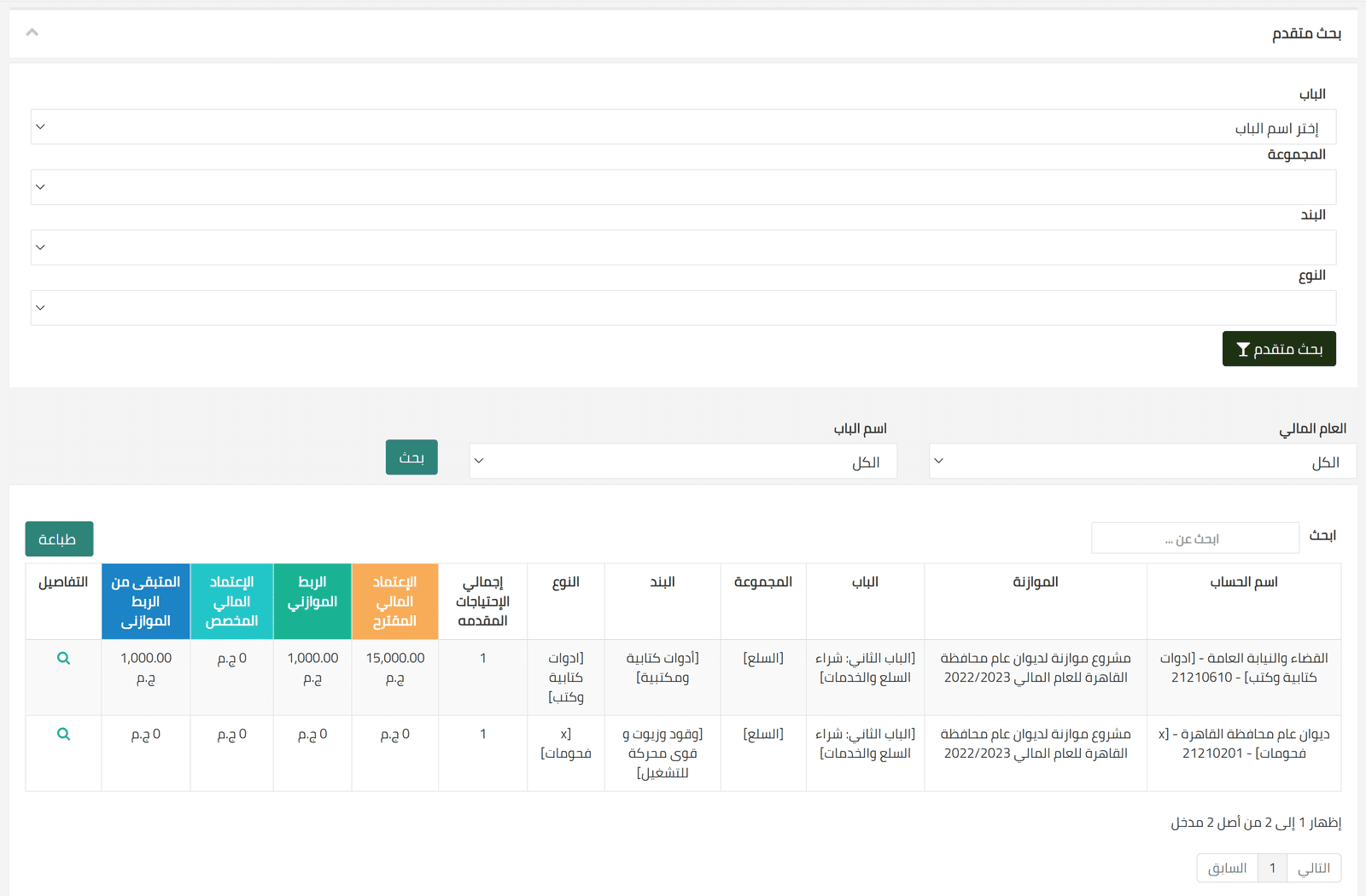
2. Sectors consolidate requests for the Finance and Planning Department

Each sector (budget unit) reviews the requests raised by its subordinate departments together with its own, approves them and submits the consolidated set to the Finance and Planning Department within the set timetable.

Sector consolidation view of departmental budget requests with advanced search by budget classification (Arabic interface)

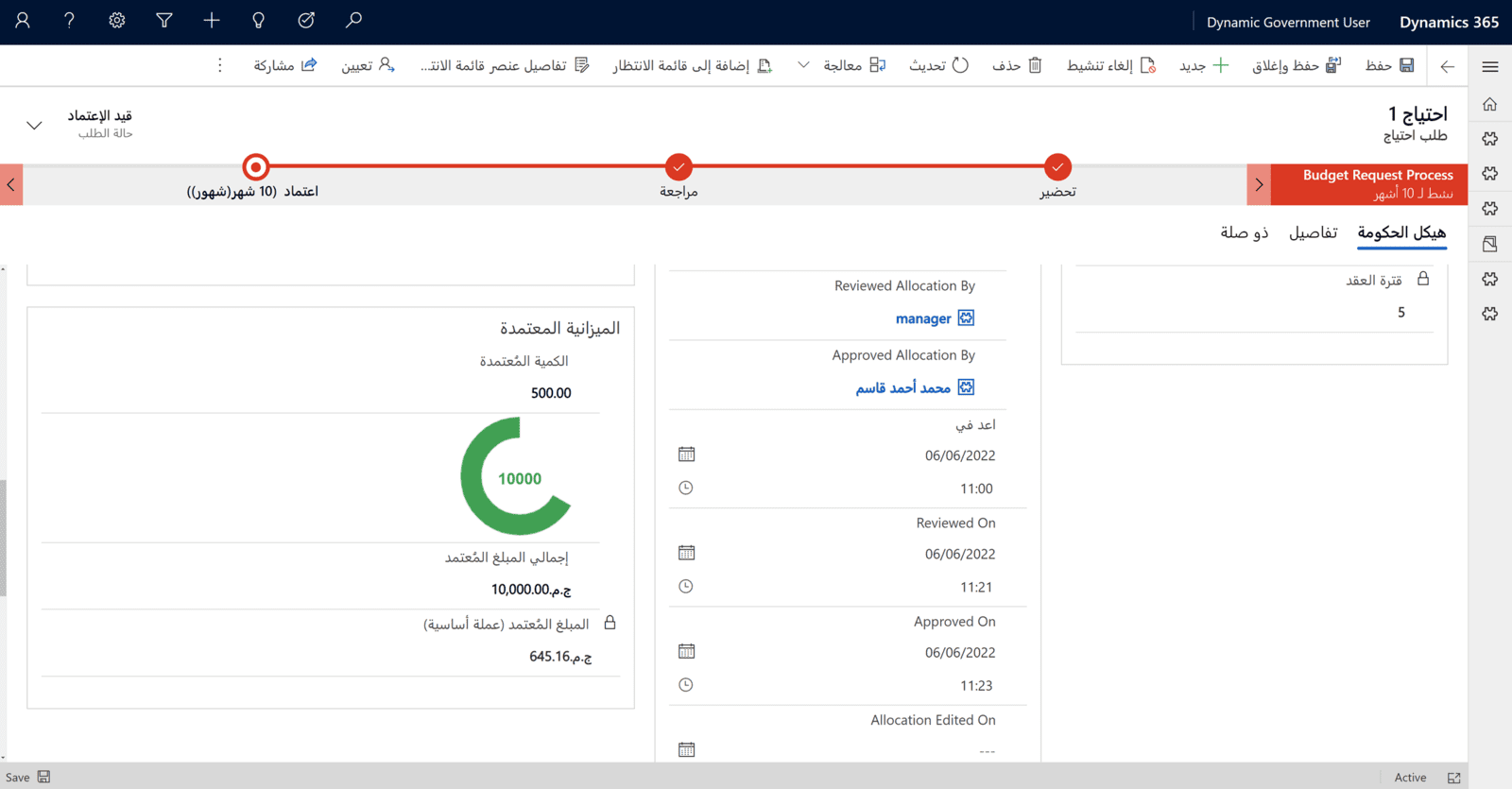
3. Finance and Planning reviews and prepares the budget project

The Finance and Planning Department can review detailed requests from every sector and department, or total amounts requested per budget account, and respond per request or per summarized amount. It then generates the budget project reports and forms for the Ministry of Finance. It can also respond directly from the ERP system: the ERP integration sends summarized requests by budget account to the ERP, and once approved budgets are assigned there, they flow back to departmental users for reallocation.

Finance and Planning Department budget review screen

4. Sectors and departments reallocate the approved amounts

The amounts approved by the Ministry of Finance are entered against the budget accounts and allocated to departments and projects. When approved budgets differ from the requested amounts, sector and department users (budget units and subsidiary units) are prompted to amend their needs plan and reallocate the approved amounts across their original procurement needs.

Reallocation of approved budget amounts across procurement needs, showing proposed needs and allocated funding (Arabic interface)
Year-round control

Control continues after the budget is approved

Three screens from the current release, shown with the Arabic interface.

01

Every submitted need in one register

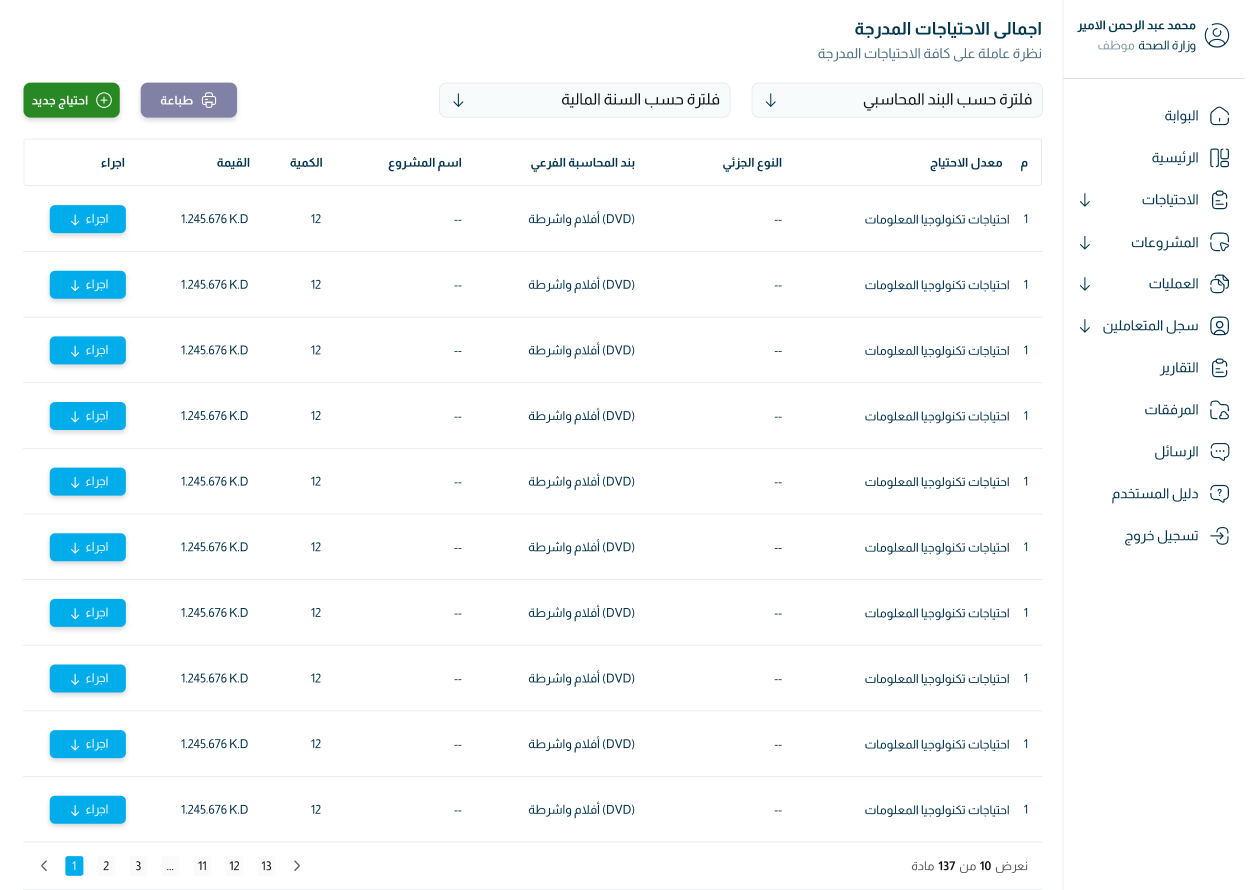
A consolidated view lists all submitted needs with their sub-accounting item, project, quantity and value. Budget teams move from gathering data to reviewing it.

  • Filter by accounting item or fiscal year
  • Open, review and act on any need from the list
  • Print the register for committee review
Register of all submitted budget needs with filters by accounting item and fiscal year (Arabic interface)
02

No commitment without budget cover

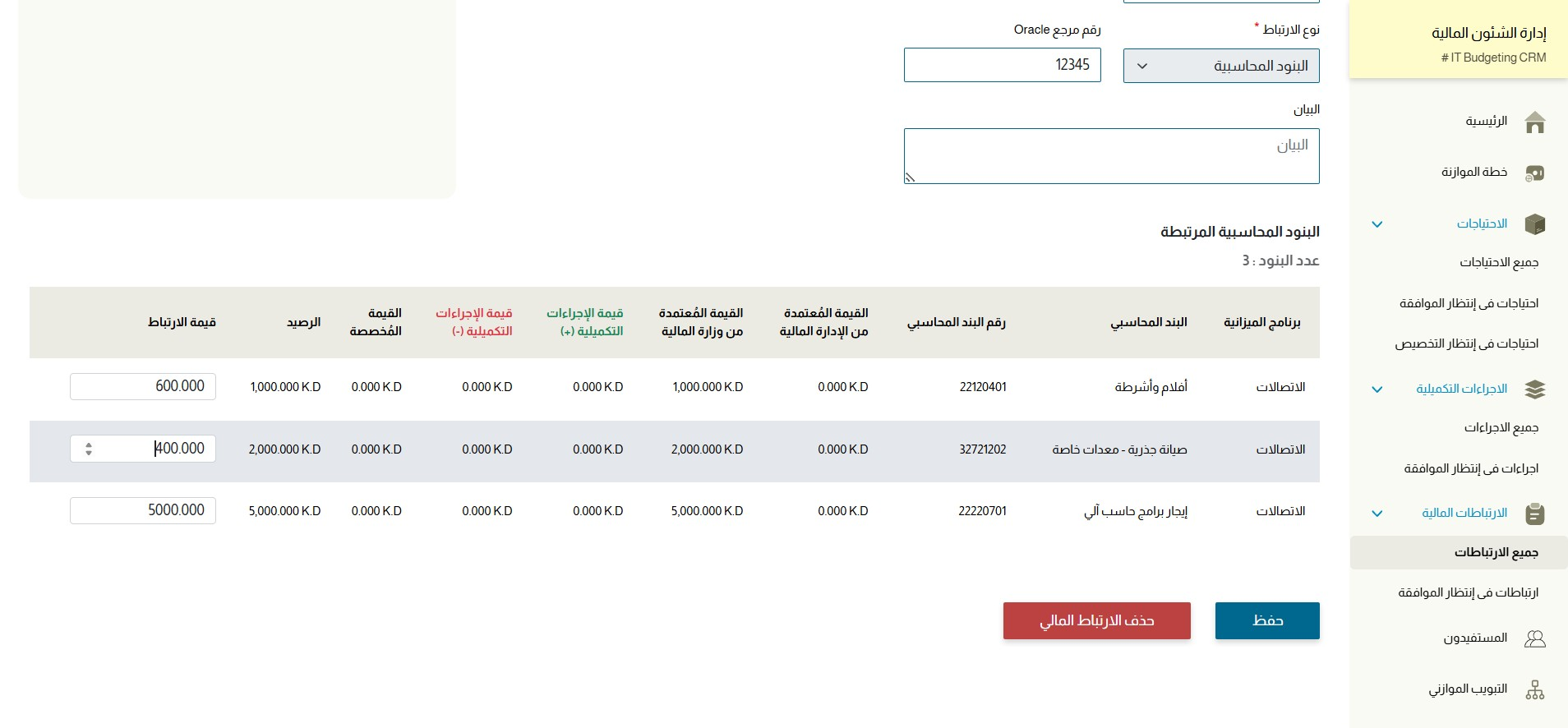
Before a purchase request proceeds, finance creates a financial commitment against the relevant budget items, subject to the funds available on each item.

  • Ministry of Finance approved value, supplementary adjustments, allocated value and balance shown per item
  • Commitment value entered item by item
  • External financial system reference recorded on the commitment
Financial commitment screen linking a request to budget items with approved value, supplementary adjustments, allocated value, balance and commitment value (Arabic interface)
03

Supplementary procedures follow the same approval discipline

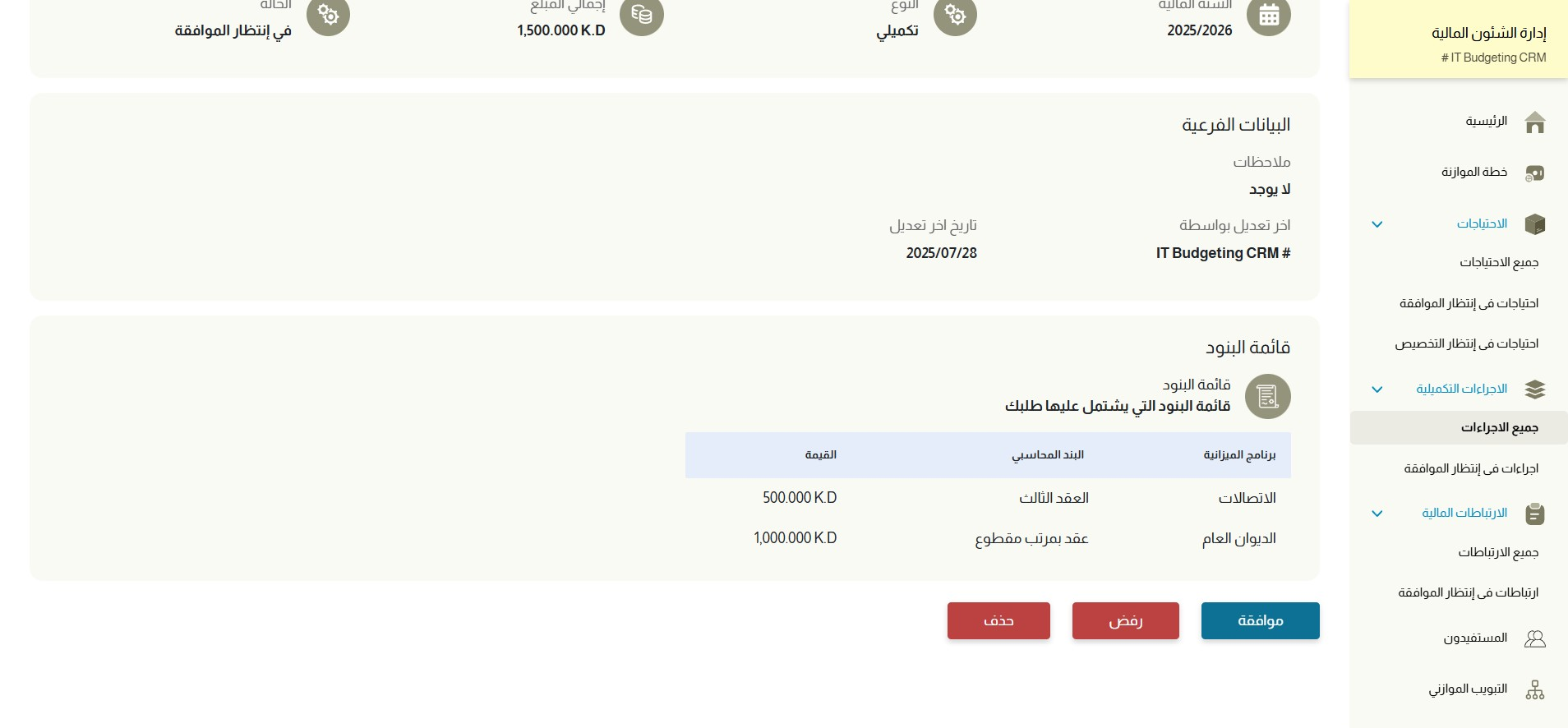
Mid-year supplementary requests list the budget program, accounting item and value of each line, show their status and wait for an explicit decision from finance.

  • Pending requests queued for approval
  • Approve or reject in one step
  • Last change and author recorded on the request
Supplementary budget procedure awaiting approval, listing budget programs, accounting items and values with approve and reject actions (Arabic interface)
Solution components

Five components give every role its own way in

Requesting departments, sector heads and the planning team each work in a dedicated portal or app on the same data.

Internal BudgetingPlanning & Budgeting
  • Budget Entry Portal

    Dedicated access for requesting departments to start the procurement budgeting process.

  • Management Portal

    Dedicated access for sector heads to consolidate and manage departmental budget requests.

  • Procurement & Planning App

    Dedicated access for system management, report extraction and business intelligence.

  • Analysis & BI

    Analytical dashboards covering all budgeting operations and activities.

  • Integration Module

    System interfaces for exchanging information with other software, such as ERP systems.

Functional modules

Six modules run the budget behind the portals

A modular design keeps the suite secure and adaptable as public sector fiscal technology evolves.

Budget Preparation Engine

The foundation for creating, structuring and submitting budget proposals with configurable templates. Supports multi-level line items, cross-departmental consolidation and automated validation against fiscal policies and historical baselines.

Execution & Monitoring Module

Tracks commitments, expenditures and remaining balances in real time, with threshold alerts, variance dashboards and integration with procurement and payment systems.

Transfer & Amendment Management

Governs transfers between departments, supplementary allocations and mid-year amendments through configurable approval hierarchies and a complete audit trail.

Taxonomy & Compliance Engine

Pre-loaded with the official chart of accounts, program codes and allowable classifications. Maps each need to the correct accounting code, rejects non-compliant entries, and tags spending against national sustainability or green taxonomies for climate finance reporting.

Reporting & Analytics Platform

Microsoft Power BI turns budget data into actionable intelligence with interactive dashboards, drill-down analytics and automated reports for legislative review and executive oversight.

Security & Compliance Framework

Hierarchical role-based access control, segregation of duties, tamper-proof audit trails, and compliance with international standards including ISO/IEC 27001 and national data sovereignty regulations.

Architecture

Four layers on Microsoft Azure and the Power Platform

The solution is a composable, layered structure, not a monolithic application. Each layer scales and evolves independently while sharing one secure data model.

Core Infrastructure Orchestration Taxonomy / Compliance Intelligence
  1. 01

    Intelligence

    Azure Synapse Analytics and Power BI deliver live dashboards, variance analysis, anomaly detection and burn-rate tracking. Azure OpenAI adds forecasting and natural language queries.

    • Power BI
    • Azure OpenAI
    • Azure Synapse Analytics
  2. 02

    Taxonomy and compliance

    A rules engine maps every request to the official chart of accounts and blocks non-compliant entries before they enter the system.

    • Rules Engine
    • Chart of accounts
  3. 03

    Orchestration

    Power Automate routes requests and approvals through multi-tiered matrices that administrators design visually. It sends notifications, tracks bottlenecks and enforces time-bound service levels for budget reviews.

    • Power Automate
    • Power Apps
  4. 04

    Core infrastructure

    Microsoft Azure hosts the platform. Dataverse and Azure Data Lake Gen2 hold ledgers and documents. Single sign-on with Microsoft Entra ID and role-based access govern every user, and every action is logged.

    • Azure
    • SSO
    • Data Lake Gen2
    • Dataverse

The four foundational layers of the Internal Budgeting platform, built on Microsoft Azure and the Power Platform.

Cognitive AI

From reactive reporting to a prescriptive financial advisor

The cognitive layer, driven by Azure OpenAI and machine learning models, works across several AI modalities.

Predictive models

Neural networks analyze historical execution data alongside real-time macroeconomic indicators. They find hidden patterns and seasonality and generate revenue and expenditure forecasts that account for workload elasticity and regional economic differences.

Natural language processing

NLP models parse thousands of pages of budget documentation and flag logical inconsistencies, duplicate funding requests and policy contradictions that manual review would miss.

Agentic workflows and generative AI

Agentic AI manages entire forecasting workflows. Generative AI co-pilots let planners question financial models in plain language, for example the effect on the debt-to-GDP ratio if infrastructure spending rises by 10% next quarter, and return modeled outcomes in seconds. They also synthesize variance reports and draft documentation.

Virtual assistants for staff

Chatbots guide employees through the budgeting process, answer policy questions in real time and speed up access to information. Document intelligence with retrieval-augmented generation pre-populates forms, and an advisory chatbot is built with Copilot Studio.

Key features

Everything you need to plan, approve and control the budget

  • Configurable budget templates: pre-built, customizable templates with multi-level line items, cost centers and project-based allocations
  • Multi-level approval workflows: automated routing from department heads through finance controllers to executive leadership, with delegation and escalation rules
  • Real-time commitment tracking: continuous monitoring of commitments against approved allocations, with threshold alerts and variance analysis
  • Budget transfer management: structured workflows for inter-departmental transfers, supplementary allocations and mid-year amendments, with full audit trail
  • Interactive Power BI dashboards: drill-down views of utilization, spending trends, departmental comparisons and fiscal-year performance
  • ERP bidirectional synchronization: native integration with Dynamics 365 Finance for consistent data across budgeting, procurement and payment
  • Segregation of duties: enforced separation of preparation, approval and execution roles to prevent unauthorized changes
  • Automated notifications and alerts: approval deadlines, threshold breaches, pending transfers and compliance milestones via email, SMS and in-app channels
  • Statutory forms and exports: the standard forms, tables and budget models required by oversight bodies or the Ministry of Finance, generated automatically
  • HR and workforce budgeting: headcount budgeting, salary and benefits cost planning, and workforce allocation by department
  • Public transparency portal: publish the planned budget and give citizens visibility of the annual procurement needs plan
  • Open API ecosystem: secure data exchange with HR systems, asset databases and central treasury accounts through an API management gateway
  • Single sign-on and role-based access: Microsoft Entra ID for identity, with secrets managed in Azure Key Vault
  • Separate development, sandbox and production environments
Business intelligence

Power BI analytics for more accurate budgets

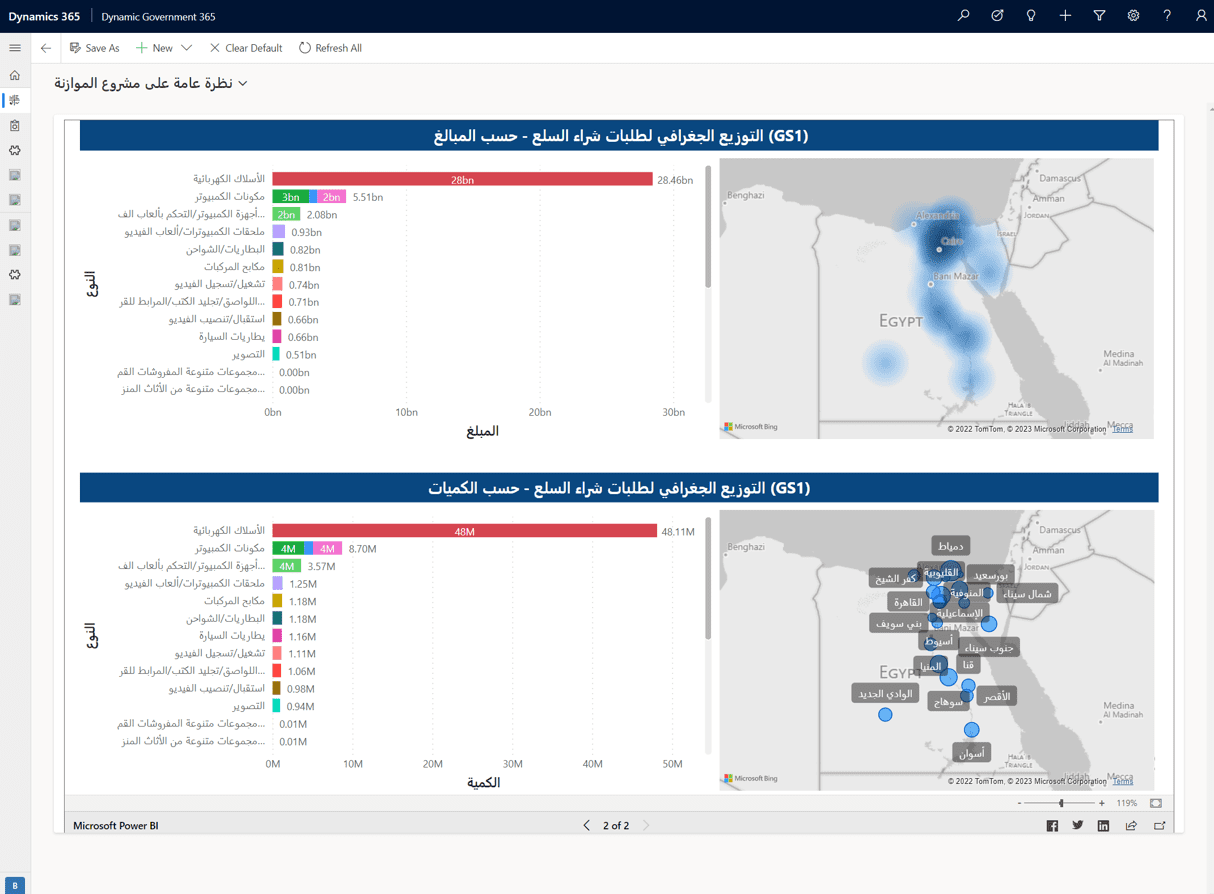
Power BI connects to your data sources, builds visuals and delivers business intelligence quickly. The BI add-on provides real-time updates on financial data, so you can spot trends and potential issues early, adjust budgets accordingly and make better-informed decisions.

Controllers track planned versus actual spending in near real time, monitor burn rates and drill down into specific expenditures, identifying inefficiencies and potential overruns long before they trigger formal audit mechanisms.

  • Historical and current views for each organizational unit
  • Adjustable data views for deeper insight
  • Pre-built reports, plus the ability for users to create new ones
Power BI dashboard showing geographic distribution of commodity procurement requests by amount and quantity, coded with GS1
Global compliance

Commodity catalog coded to GS1 global standards

Commodity procurement items in Dynamic Government are coded against a global catalog that maps your internal codes to GS1 codes.

GS1 standards are the most widely used system of standards in the world. By enabling the sharing of trusted, quality data, they tell the story behind each product: where it originated, what it contains and where it has been on its supply-chain journey. This removes friction between business partners and improves performance and safety across the supply chain.

GS1 is a neutral, global collaboration platform that brings together industry leaders, government, regulators, academia and associations to develop standards-based solutions for data exchange. With local Member Organizations in 116 countries, more than two million user companies and 6 billion transactions every day, it provides a common language of business worldwide.

GS1 logo
Three editions

Start with fiscal control, grow into cognitive budgeting

Each edition builds on the one before it, so capabilities scale with your digitalization journey.

Tier 1 · Fiscal Foundation Edition

For agencies and local government entities beginning their digital transformation. Establishes baseline control, standardized data inputs and a single digital ledger for budget formulation.

  • Self-service needs planning portal
  • Deterministic workflow routing with Power Automate
  • Basic taxonomy mapping to the official chart of accounts
  • Centralized consolidation dashboard
  • Static reporting and export of statutory forms
  • Unified single sign-on and secure access

Tier 2 · Enterprise Governance EditionRecommended

For mature entities, mid-to-large ministries and complex agencies. Everything in Fiscal Foundation, plus systemic controls, advanced analytics and dynamic reconciliation.

  • Advanced national taxonomy compliance, including green finance taxonomies
  • Real-time automated reconciliation to approved ceilings
  • Preventive cover verification
  • Dynamic variance analysis with live Power BI dashboards
  • Interoperable API ecosystem
  • Generative AI virtual assistants for guidance

Tier 3 · Cognitive Sovereign Edition

For advanced ministries, sovereign wealth funds and central finance authorities. Everything in Enterprise Governance, plus predictive, prescriptive and autonomous fiscal intelligence.

  • AI-driven macroeconomic forecasting
  • Algorithmic what-if scenario simulation
  • Priority-based optimization models
  • Natural language policy alignment (NLP)
  • Generative AI autonomous assistants on Azure OpenAI
  • Autonomous workflow management (agentic AI)
Edition comparison

How capability escalates across the three tiers

From basic workflow automation to AI-driven macroeconomic planning.

Feature categoryTier 1 Fiscal FoundationTier 2 Enterprise GovernanceTier 3 Cognitive Sovereign
Workflow and operations
Unified single sign-on (SSO) and secure accessYesYesYes
Automated hierarchical approval pathsYesYesYes
Real-time budget lifecycle follow-upNoYesYes
Autonomous workflow management (agentic AI)NoNoYes
Financial control and compliance
Accounting taxonomy and early financial planningYesYesYes
National taxonomy screening and whitelistingNoYesYes
NLP-driven budget inconsistency detectionNoNoYes
Reporting, analytics and AI capabilities
Centralized database (eliminates paper storage)YesYesYes
Live dashboards tracking spending against KPIsNoYesYes
Generative AI virtual assistants for guidanceNoYesYes
Interactive what-if scenario modelingNoNoYes
Predictive analytics for revenue forecastingNoNoYes
Neural networks using multidimensional dataNoNoYes

✓ included · ✗ not available at this tier. Rows without marks are category headings.

System screenshots

See the Internal Budgeting System in action

Screens from the budget entry portal, shown with the Arabic interface.

Technologies

Built on the Microsoft cloud

Microsoft Dynamics 365

Microsoft Dynamics 365

Business application platform and native ERP integration.

Microsoft Power Platform

Microsoft Power Platform

Power Apps and Power Automate for portals and approval workflows.

Microsoft Power BI

Microsoft Power BI

Interactive dashboards and budget analytics.

Microsoft Azure

Microsoft Azure

Secure, sovereign-ready cloud infrastructure, data lake and AI services.

Android

Android

Mobile access on Android devices.

iOS

iOS

Mobile access on iPhone and iPad.

Bring your next budget cycle onto one platform

See how the Internal Budgeting System connects planning to eTendering and Contract Management for end-to-end spending control.