
SSO integration
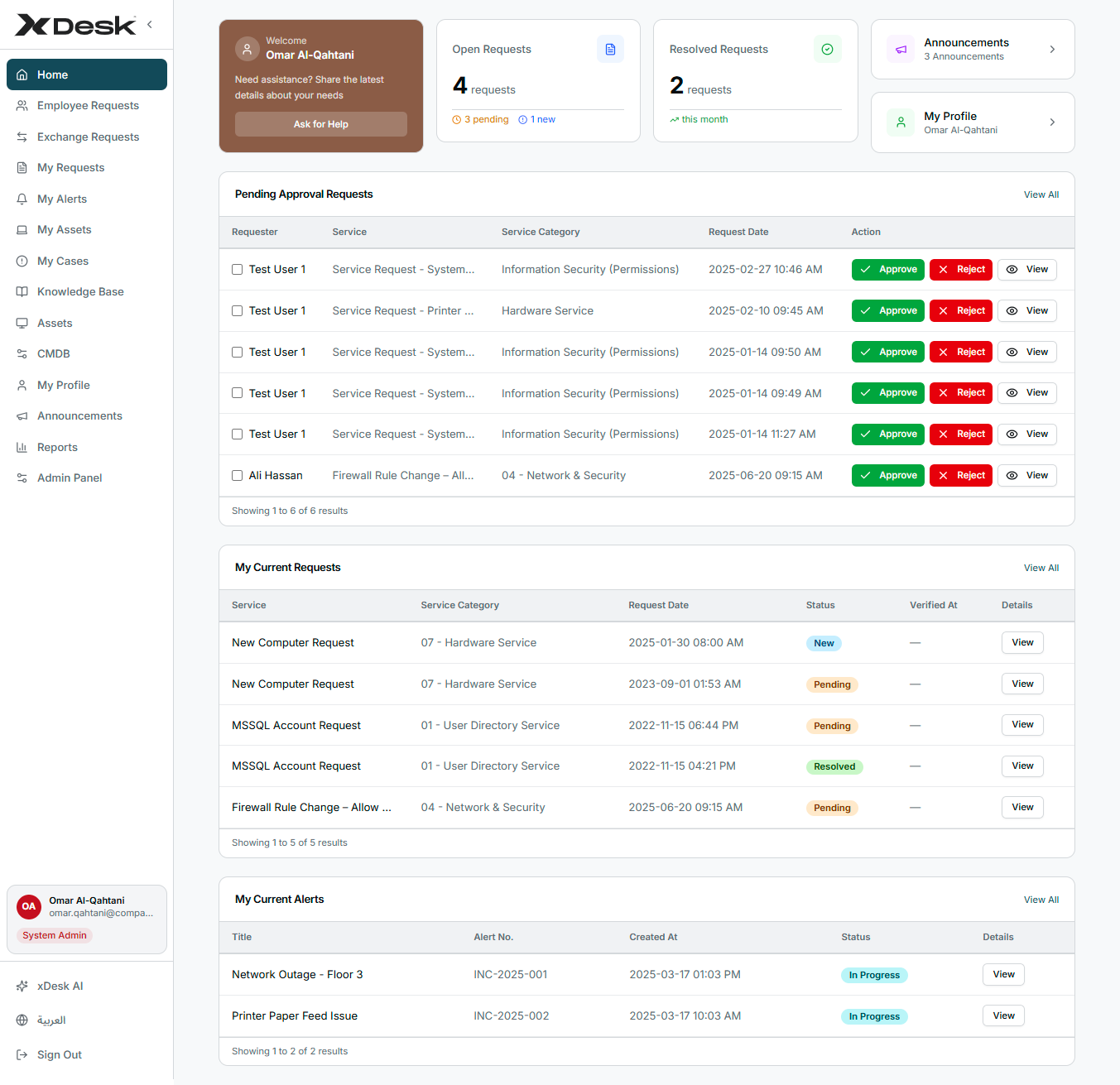
Single sign-on brings employees into the portal with their organizational account.
Service & Asset Management
One platform for the service desk, the asset register and the storeroom. Built on Microsoft Dynamics 365, xDesk joins IT Service Management (ITSM), Enterprise Asset Management and Procurement, so government organizations see and control every request, asset and purchase from end to end.
Microsoft recommends xDesk for internal service management and IT Service Management (ITSM) in the government sector.
xDesk streamlines the delivery of internal IT and other support services to employees. It automates service and support processes, organizes support teams and helps them meet their service level goals, with support available 24/7 through a self-service portal, mobile apps and an AI assistant.
Built natively on Microsoft Dynamics 365, xDesk is purpose-built for the operational, compliance and security requirements of government entities. It closes the gap between ITSM, Enterprise Asset Management and Procurement on a single foundation, with enterprise-grade reliability and sovereign control over your data.
Consistent support across every user touchpoint and device: self-service portals, mobile apps, the call center, WhatsApp and an AI assistant.
Enterprise-grade security, scalability and performance, with native integration across the Microsoft ecosystem.
Case management, inventory control and IT financials combined natively, with no complex third-party add-ons.
Deploy in the cloud, on-premises or in a private cloud, whichever your organization requires.
Four layers work as one platform. Each audience enters through its own portal, the core modules are combined natively, and intelligence and automation run across all of them.
A dedicated entry point for each audience, on the web and in the field.
The business capabilities of xDesk, delivered as one product rather than separate tools.
Analytics, AI assistance and workflow rules that serve every module.
The Microsoft platform underneath, deployed in the cloud, on-premises or in a private cloud.
xDesk inherits the security and compliance posture of the Microsoft platform it runs on.
The application framework and workflow engine xDesk is built on.
The cloud foundation, with on-premises and private cloud deployment options.
Power BI analytics and the managed online deployment.
The AI helper inside xDesk, managed under ISO 42001.
From the service desk to the warehouse floor, xDesk covers the full support and logistics chain.
Standardize service processes with automated workflows, dynamic routing and a centralized knowledge base.
Full accountability from acquisition to disposal, with end-to-end logistics tracking.
Close the gap between IT operations and purchasing with native procurement integration.
Give on-site teams, storekeepers and warehouse staff a dedicated mobile application.
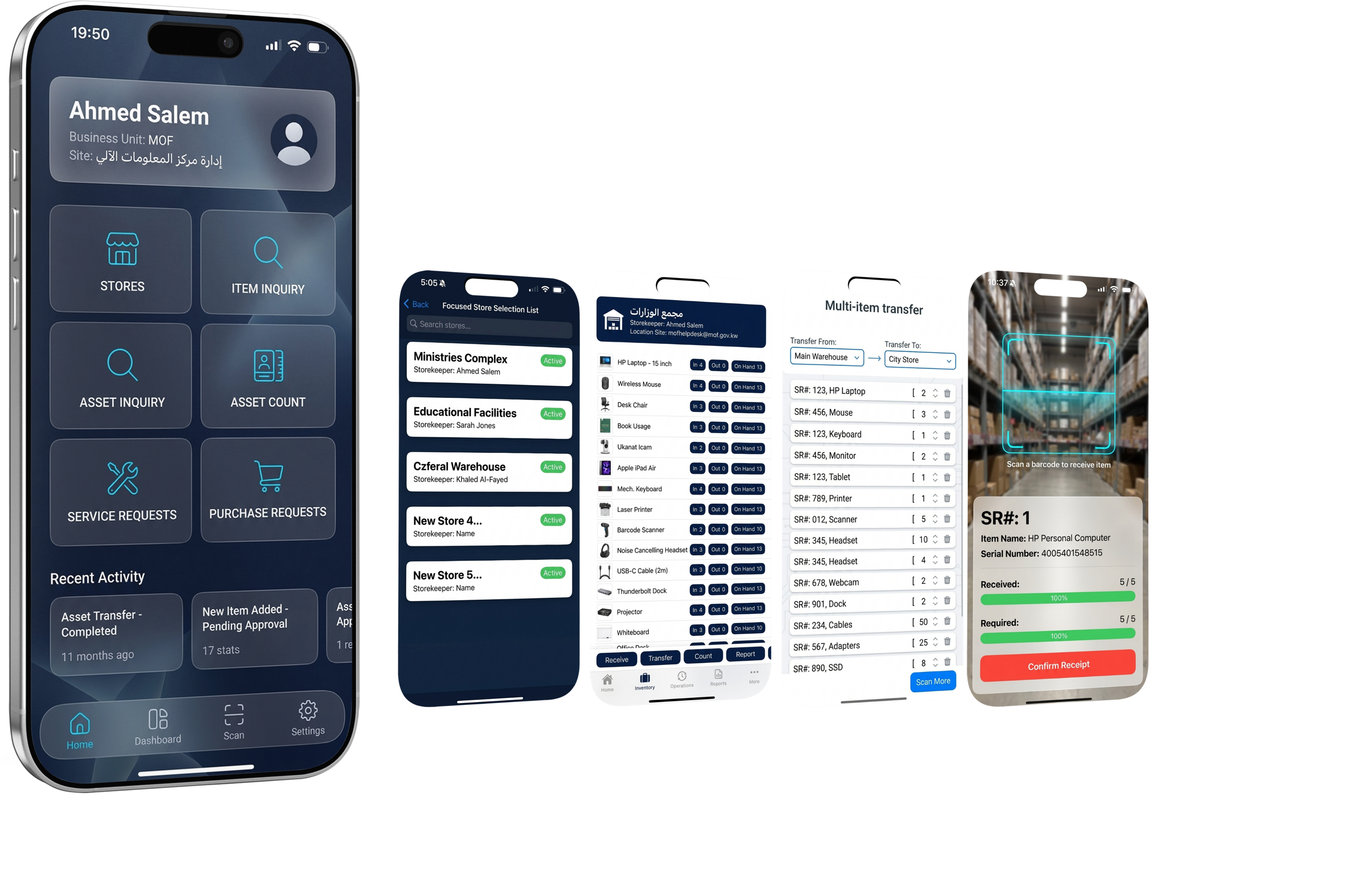
Employees reach xDesk through self-service portals, mobile apps, the call center, WhatsApp and an AI assistant. Every channel feeds the same back-end system.
The ISO 9001-compliant Service Catalog Studio. Service process templates keep delivery consistent and cut the effort of setting up new services.
A built-in library of service automation processes that you customize with your own escalation parameters and routing channels.
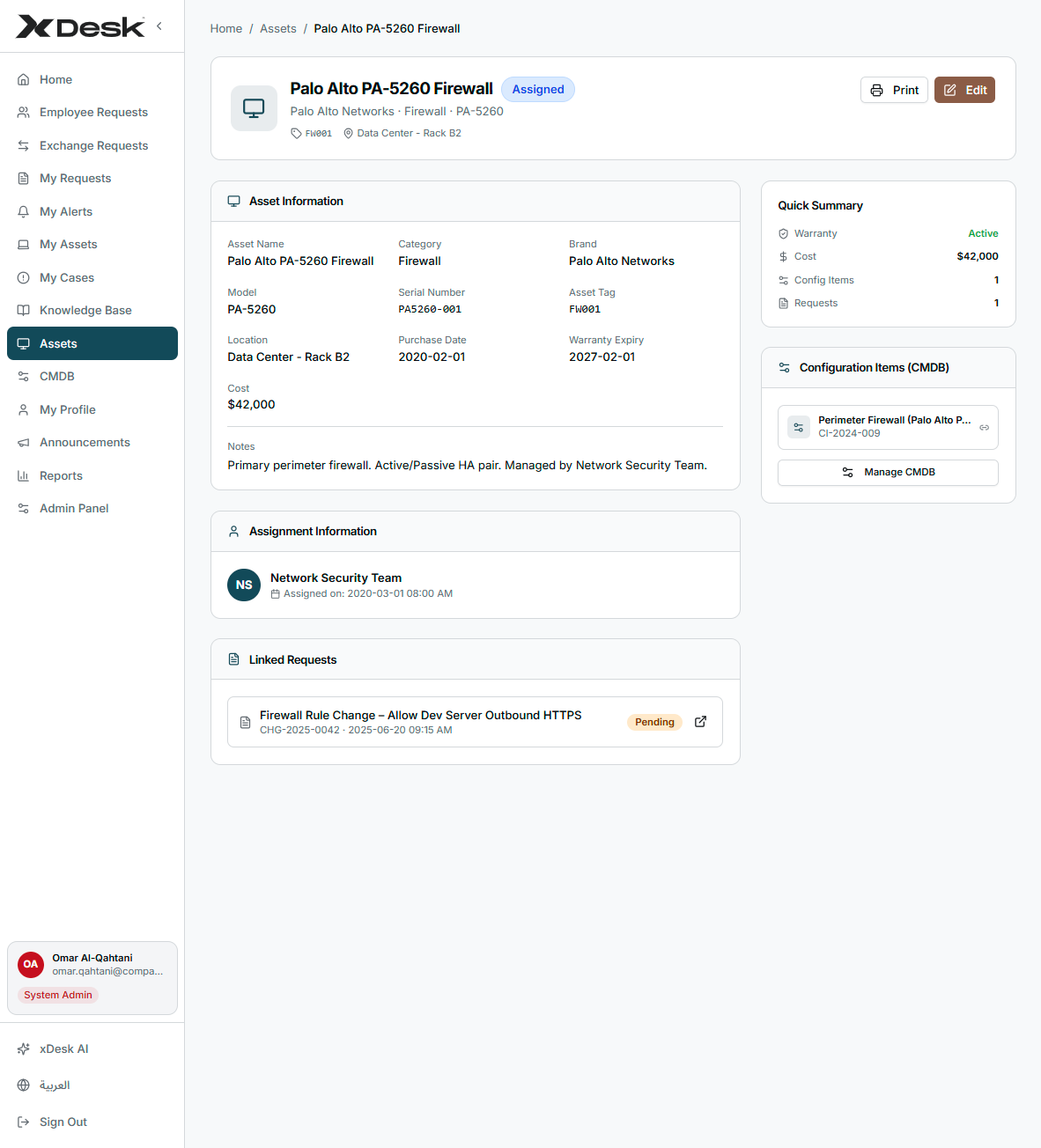
Support teams work each case in context, linked to the related asset and the requester's profile.
Asset lifecycle, multi-store inventory and procurement linkage in the same system as the service desk.
Articles, policies and user guides that let employees resolve common issues themselves.
Power BI dashboards report service performance against service level goals.
Service channels: self-service portals, call centers and self-service mobile apps, plus WhatsApp and OpenAI GPT as third-party channels.
A feature-rich portal and mobile apps let employees raise, follow and resolve requests on their own, which reduces dependency on support teams.
Single sign-on brings employees into the portal with their organizational account.
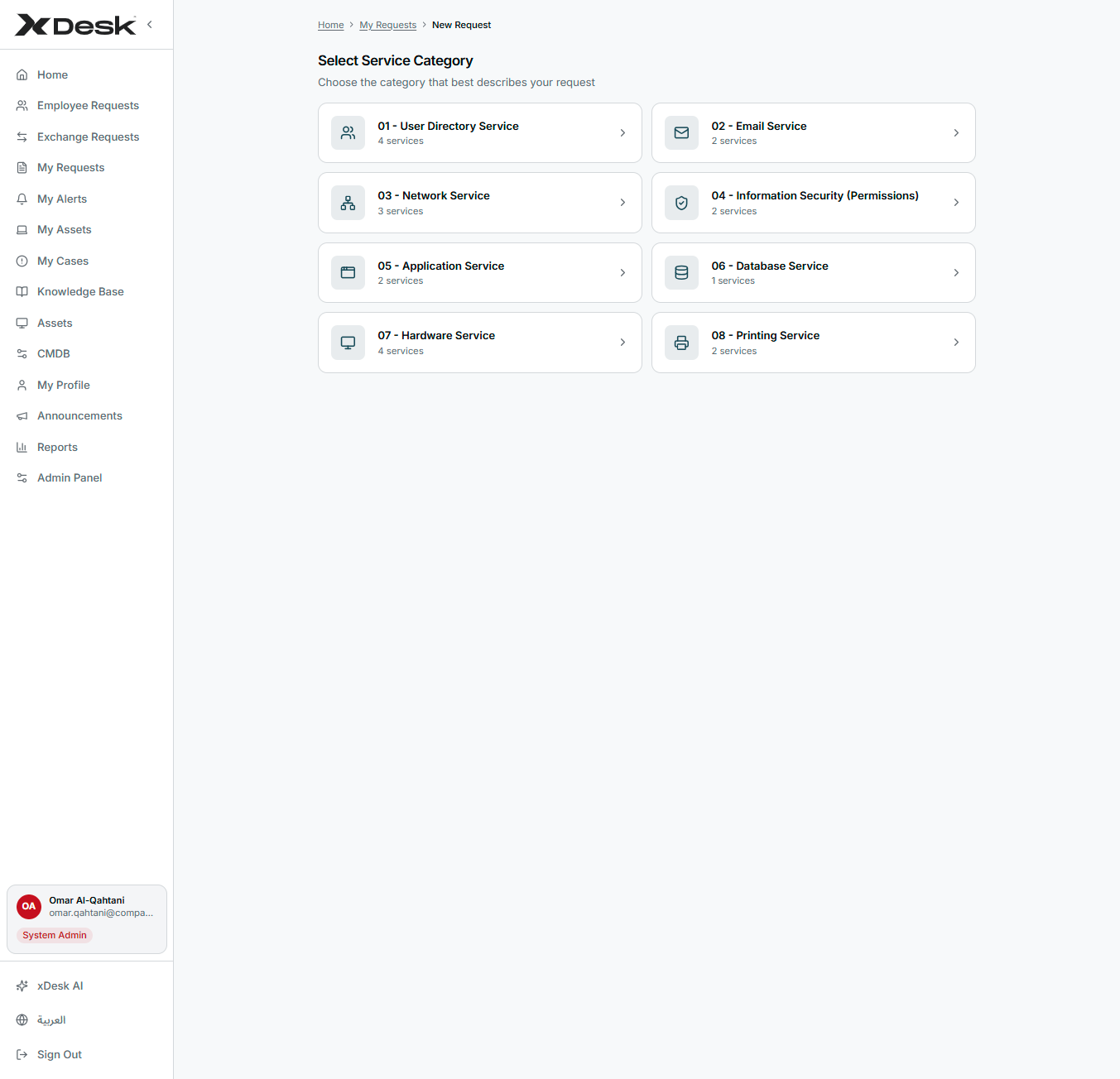
Services are grouped by category in the catalog, so each request starts in the right place and reaches the right team.
Smart forms adapt to the user's role, the request type and the inputs selected. Built-in logic and validation, attachments, workflow integration and an audit trail replace manual paperwork.
Requesters see real-time status at every stage, from submission to completion, through multi-channel notifications and a transparent process flow.
A searchable library of how-to guides, policies, procedures and user guides answers common questions before a ticket is raised.
xDesk AI guides employees through submitting a service request, in multiple languages. The portal itself is available in Arabic and English.
xDesk automates the internal service desk. Each step is assigned, measured against its SLA and visible to the requester.
An employee picks a service from the catalog and completes a smart eForm that adapts to the request type.
The direct manager reviews the request and approves or rejects it in the manager portal.
xDesk assigns the request to the correct support team automatically, across departments.
Every step is monitored against its service level, with your escalation parameters built into the flow.
A specialist resolves the case in context, with the linked asset and the requester's profile on screen.
The requester sees the outcome in real time, and performance KPIs feed the service intelligence dashboards.
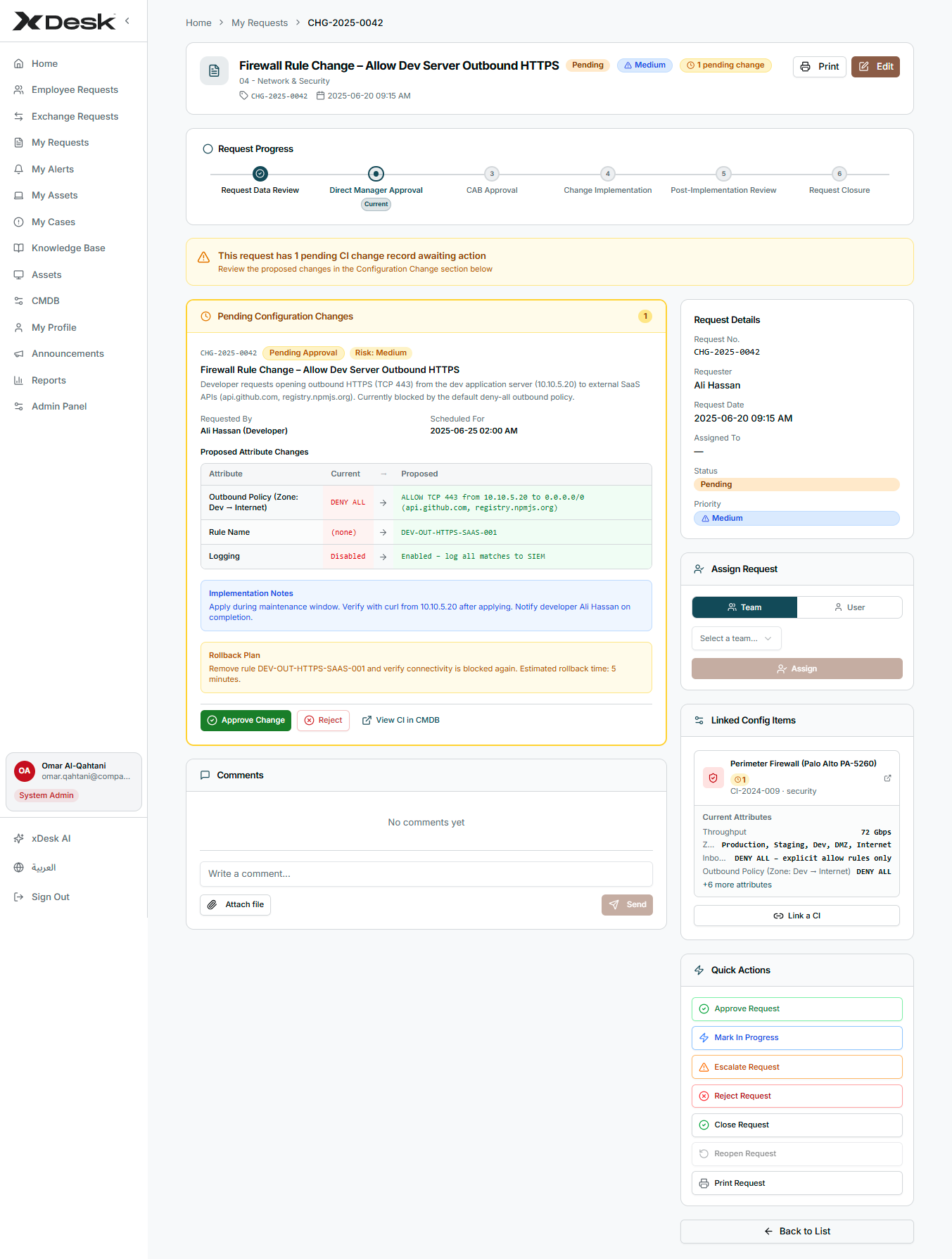
Changes to infrastructure follow a staged path, and the current stage is visible to everyone involved. Each change request is tied to the configuration items it affects, so approvers see exactly what will change.
Pending configuration changes show current and proposed values, implementation notes and a rollback plan, and the request stays flagged until someone acts on them.
Each stakeholder gets the tools, data and workflows their responsibilities require. Tailoring the interface to the role reduces cognitive load and training time.
Users sign in through a single login page. xDesk routes each of them to their designated portal and opens the dashboard that matches their assigned role.
Submit IT service requests, track status updates, search the centralized knowledge base for self-help solutions and view assigned assets.
Review and approve pending service requests or procurement requisitions from direct reports, keeping them compliant and within budget.
Oversee team performance, monitor SLA compliance, allocate resources, analyze service delivery metrics and manage IT financial budgets.
Receive, triage, resolve and close incoming service requests. Manage asset lifecycles, perform inventory movements and execute procurement tasks.
Configure system settings, manage user roles and access controls, maintain the service catalog and oversee platform administration.
Employees get a self-service journey, managers keep visibility without administrative burden, and IT teams work from one action-oriented console.
| Role and portal | Raise and track requests | Approve requests | Resolve requests | Assets and inventory | SLAs and budgets | Platform setup |
|---|---|---|---|---|---|---|
| Normal UserSelf-Service Portal | Core responsibility | Not part of this role | Not part of this role | Supporting access | Not part of this role | Not part of this role |
| Direct ManagerManager Approval Portal | Not part of this role | Core responsibility | Not part of this role | Not part of this role | Supporting access | Not part of this role |
| IT ManagerIT Operations Dashboard | Not part of this role | Not part of this role | Supporting access | Not part of this role | Core responsibility | Not part of this role |
| IT SpecialistSupport Console | Not part of this role | Not part of this role | Core responsibility | Core responsibility | Not part of this role | Not part of this role |
| System AdminUnified Admin Panel | Supporting access | Supporting access | Supporting access | Supporting access | Supporting access | Core responsibility |
A summary of the xDesk role matrix. The System Admin has full access to all system modules, and access for every role is configured under Roles & Permissions.
xDesk unifies lifecycle tracking, financial depreciation and inventory control, so every asset is visible and accountable from acquisition to disposal.
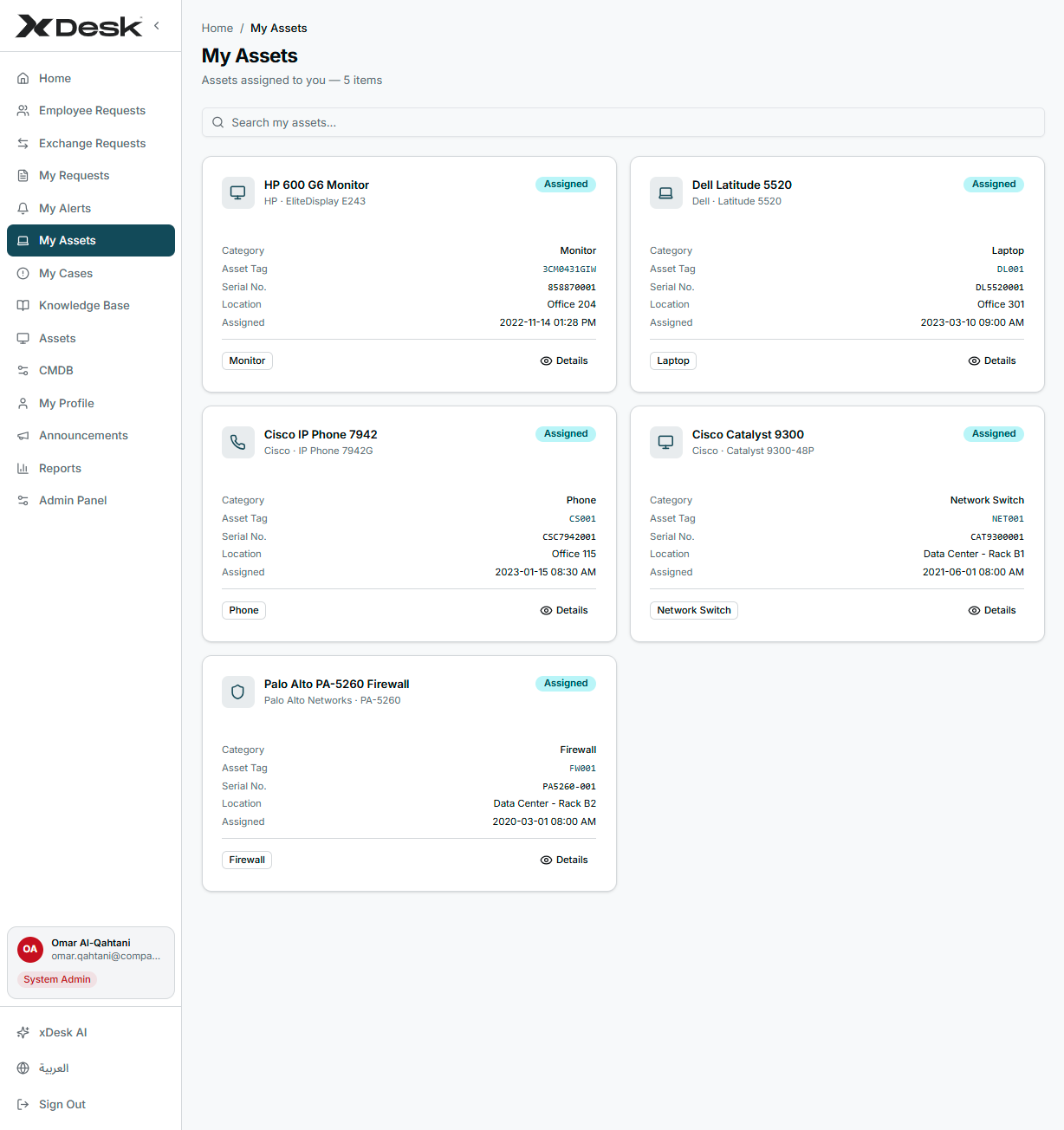
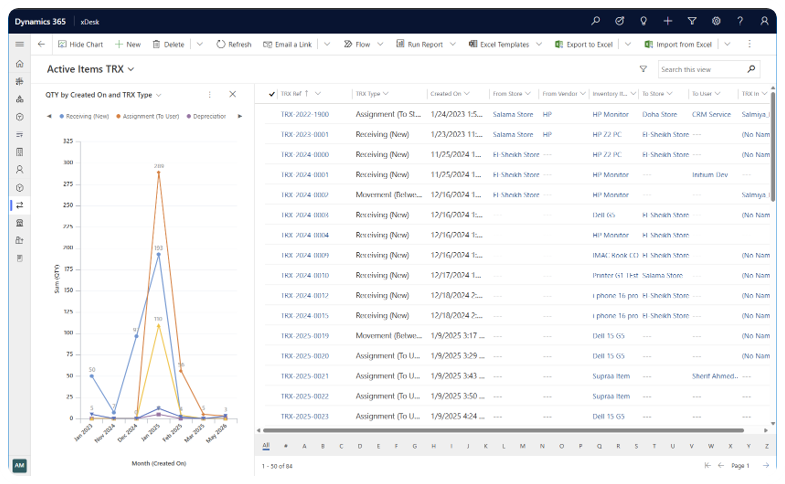
xDesk shows quantity on hand across all storage locations in real time and manages the logistics around it: receiving from vendors, assignments to users, movements between stores and depreciation.
Warehouse operations are covered in depth on the xWarehouse page.
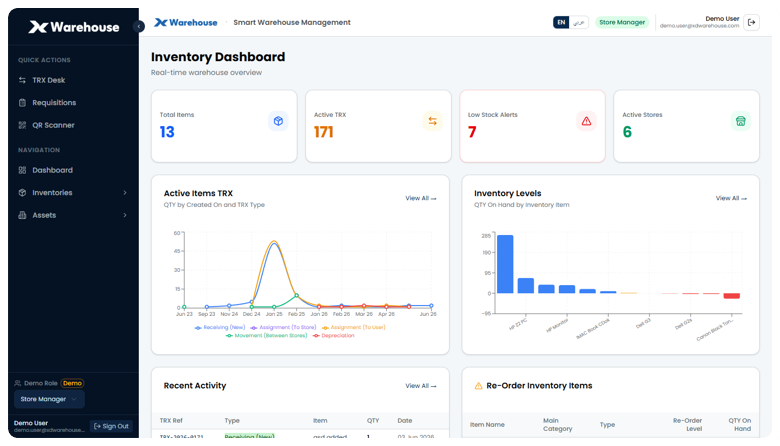
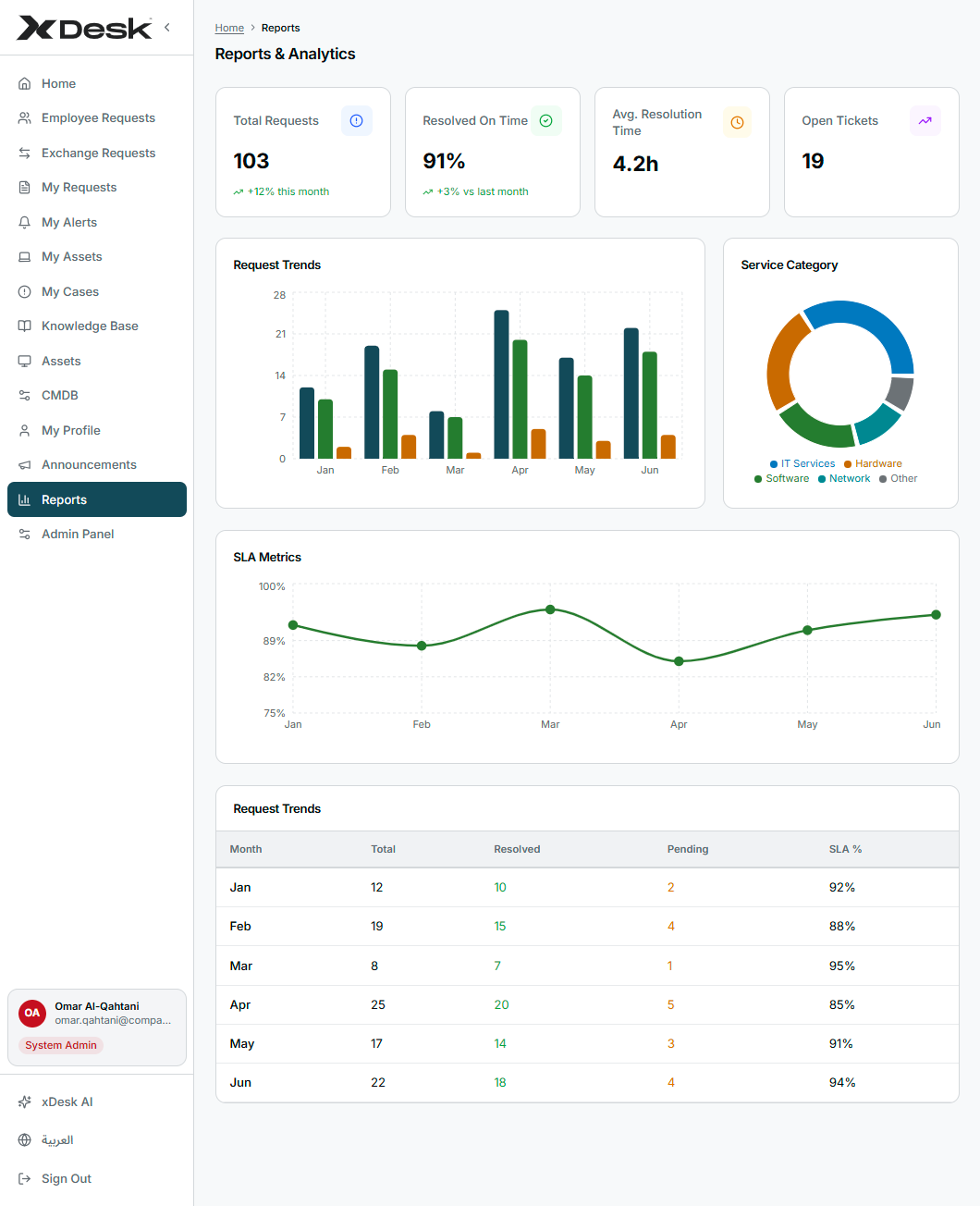
xDesk reports through interactive, real-time dashboards powered by Microsoft Power BI and Excel, integrated out of the box.
Produce complex reports and interactive charts without extra tooling. 3D geospatial views reveal geographic trends, and what-if scenarios forecast outcomes.
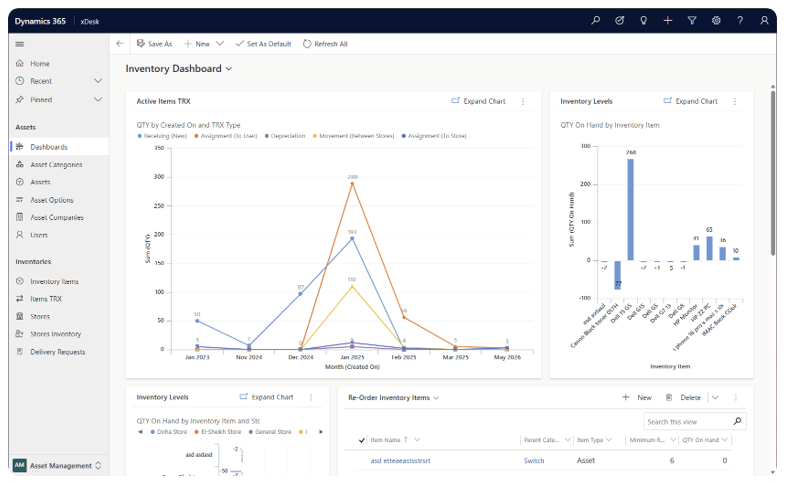
Track transaction volumes for receiving, assignments and movements, follow historical trends and see stock distribution. Drill from any chart into the asset records behind it.
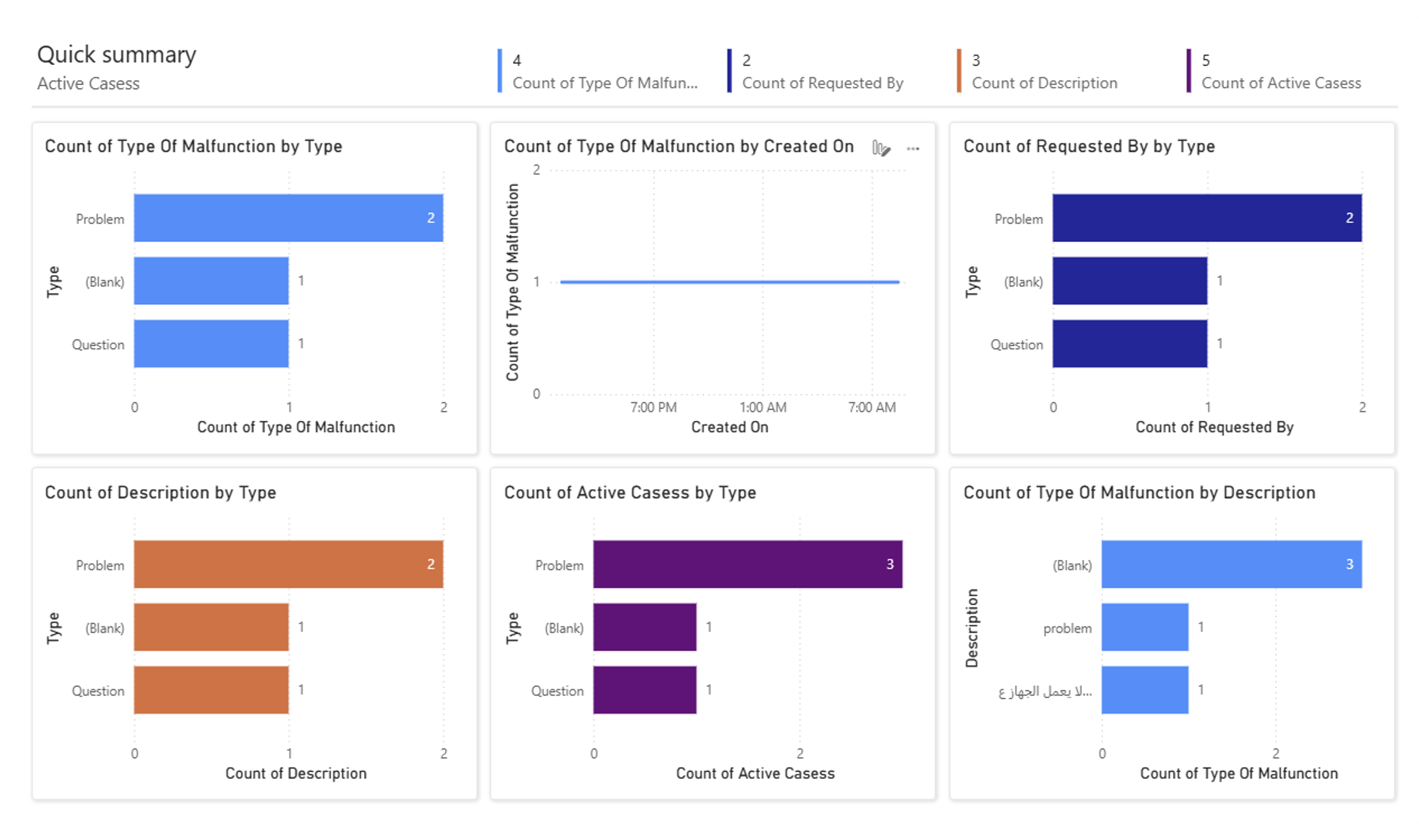
Analyze active cases, malfunction trends and request volumes by type, requester and date to address systemic IT issues before they escalate.
xDesk integrates natively with Microsoft 365, Teams, SharePoint and Copilot, alongside Power Platform and Power BI, for collaboration and productivity.

Live data and interactive dashboards with Power BI integration across every process, including 3D geospatial visualizations and what-if forecasting.
Automated workflows, intelligent routing and strict SLA monitoring replace manual processes, cutting ticket resolution time by 55%.
End-to-end lifecycle tracking from acquisition to disposal, with real-time financial and depreciation management.
Role-based portals give employees, managers and support teams exactly the tools their responsibilities require.
A dedicated app keeps field teams productive on the go, online or off. They manage stock, execute transfers and run physical counts from their phones.
Built on Dynamics 365 with enterprise-grade security, multi-tenant isolation and compliance with international standards.
Compared with traditional platforms such as Microsoft System Center Service Manager, xDesk 2026 delivers critical business functions natively instead of through expensive custom development or third-party add-ons.
Comparable functionality takes custom development and several disconnected tools.
Lower total cost and faster time to value.
| Feature | xDesk 2026 | Legacy competitors |
|---|---|---|
| Advanced case management | Built in | Built in |
| IT financial management (accounting, budgeting, costing) | Built in | Add-on |
| IT vendor management | Built in | Add-on |
| Integrated mobile app | Built in | Add-on |
Legacy competitors include traditional platforms such as Microsoft System Center Service Manager.
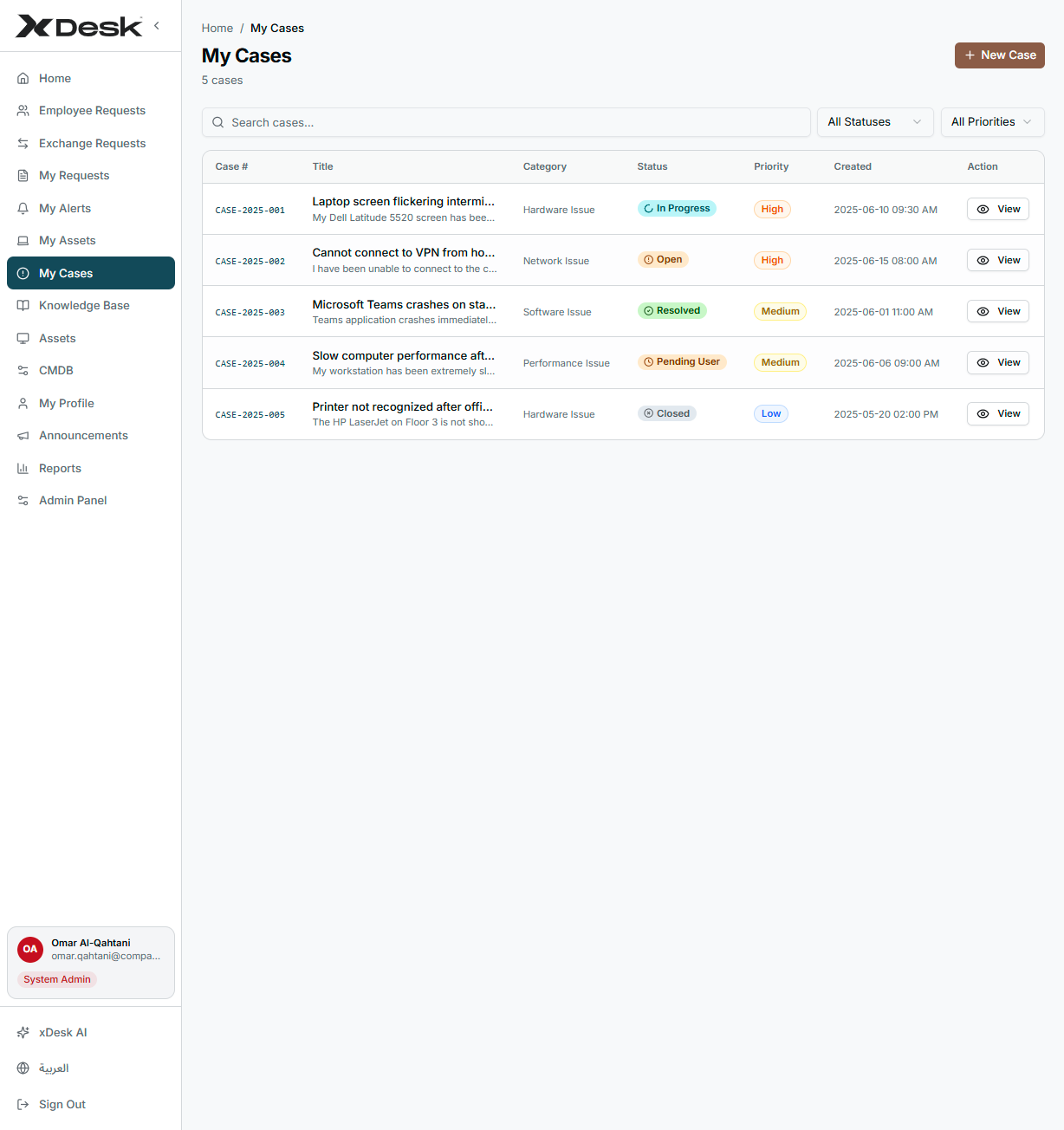
Select any screenshot to enlarge it.
xDesk supports process, service and AI governance standards, and inherits the security and compliance posture of Microsoft Azure and Dynamics 365, which carry their own platform certifications.

Quality management. xDesk helps your organization comply with ISO 9001 process standardization.

Service management best practice. xDesk covers the ITIL pillars: organizations and people, information and technology, partners and suppliers, and value streams and processes.

Responsible AI management. xDesk complies with ISO 42001, the international standard for Artificial Intelligence Management Systems, covering AI development and use.
Microsoft Azure and Dynamics 365 platform compliance: information security management.

Microsoft Azure and Dynamics 365 platform compliance: cloud security controls.
Microsoft Azure and Dynamics 365 platform compliance: business continuity management.
If ServiceNow is on your shortlist, see how xDesk compares feature by feature across architecture and deployment, ITSM, asset and warehouse management, financial and vendor management, and mobile and analytics.
Book a guided demonstration of xDesk ITSM, asset management, procurement and the mobile app, tailored to your agency's service desk and asset logistics.