
Citizens and residents
Use government services through one portal with single sign-on, track applications in real time, receive proactive notifications and keep frequently used credentials in a personal document vault.
Core Solutions · Public E-Services
Automate any public service and deliver it to citizens and businesses on the web, on mobile and in service centers. New e-services go live in minutes instead of weeks, under one governed process.

The eServices Management System is the Government-to-Citizen (G2C) and Government-to-Business (G2B) service delivery platform of Dynamic Government 365. It lets agencies rapidly automate and deploy multi-channel public services, improving efficiency, compliance and the citizen experience. Built on Microsoft Dynamics 365 and the Power Platform, it gives departments one framework for creating, publishing and managing services across web portals, mobile apps, service kiosks, AI chatbots and call centers.
Citizens and businesses reach government anytime, on the channel they prefer, while the agency keeps the security, compliance and auditability that public sector operations demand. A no-code/low-code design environment lets departments digitize services without deep technical expertise. The time and effort needed to launch a new e-service drops from weeks to minutes.
The platform can automate almost any e-service scenario. The same services are also delivered in person at service centers under the same process compliance, which reduces administrative burden and cost and increases transparency and accountability.
One citizen profile and one consistent experience across web, mobile, kiosk, chatbot and call center.
Departments build and change services themselves with a drag-and-drop service builder.
Chatbots, document OCR, auto-fill suggestions and predictive analytics personalize each citizen journey.
The agency designs and publishes. Citizens and businesses discover, apply, track and receive. Every step follows the same governed process on every channel.
Build the service in the catalog studio from a process template: forms, workflow and SLA, with no code.
Release it to websites and mobile apps, and to service centers under the same process.
Citizens and businesses find the right service in the service catalog.
Applicants complete a dynamic, guided application form.
Automated workflows route the request to the right team.
Applicants follow the status of the request in real time.
Identity and documents are verified.
The service is delivered to the applicant.
Any agency can use the platform to cut the time and effort of delivering services while raising efficiency and compliance. Three strategies make it work:
eServices serves the broadest stakeholder community on the Dynamic Government platform.
Use government services through one portal with single sign-on, track applications in real time, receive proactive notifications and keep frequently used credentials in a personal document vault.
Apply for licenses, permits and regulatory approvals online, manage organizational profiles, delegate application authority and track several requests at once. See also Commercial Relationships Management.
Design and publish new digital services with no-code/low-code tools: configure dynamic forms, define approval workflows, set SLA parameters and monitor performance on analytics dashboards.
Track service adoption, citizen satisfaction, SLA compliance and departmental performance on strategic dashboards that guide policy and resource allocation.
Citizens and businesses reach one service delivery platform through any channel, secured by a central gateway and supported by AI and integration services.
Every way the public reaches a service.
One secured entry point protects every channel.
Power Platform and Dataverse: service discovery and application, a drag-and-drop form builder with a validation engine, routing with SLA management and escalation, and case tracking with notifications and a document vault.
Assistance for citizens and insight for service teams.
Connections to national and enterprise systems.
Data, storage, security and messaging services. Also includes Power BI Embedded, Azure AD B2C, Event Grid and Service Bus.
Citizens get 24/7 access on their preferred channel. Physical visits disappear and barriers fall for remote and underserved communities.
Automated workflows, intelligent routing and SLA enforcement cut processing times by up to 70% for permits, licenses, approvals and other services.
Automated processing removes manual data entry, paper handling and repetitive tasks, so staff can focus on complex cases and citizen engagement.
Real-time tracking, proactive notifications, chatbot assistance and personalized recommendations build trust in government.
The no-code/low-code builder reduces the time and effort of launching a new e-service from weeks to minutes, without heavy IT investment.
Analytics on service volumes, processing times, satisfaction and SLA compliance drive continuous improvement and evidence-based resource allocation.
Together they cover the design, delivery and management of citizen-facing services on every channel.
A searchable catalog of all government services, organized by category, department and citizen life event, with natural-language search, recommendations based on the citizen profile and integration with national service directories.
No-code form design with drag-and-drop fields, conditional logic, multi-step wizards, file uploads, digital signature capture and real-time validation, including dependent dropdowns, calculated fields and cross-form data sharing.
Powered by Power Automate, with linear, parallel and conditional routing, configurable SLA enforcement, automatic escalation, delegation management and integration with external systems for automated verification and approval.
Case management from submission to resolution: real-time status for citizens, internal assignment and workload management, communication history and document management with version control.
A chatbot powered by Azure Cognitive Services gives 24/7 guidance, status answers and FAQs and hands over to human agents when needed. Document OCR pre-fills forms, and citizens can search for services in natural language.
Public channels, a back-office app, analytics and integration ship together as one solution.
Public web access where citizens and businesses sign up and request services.
Mobile access to the service catalog and to every service request.
The back-office app where service delivery teams and administrators manage the service catalog and service requests.
Analytical dashboards covering all e-service operations and activities.
System interfaces for exchanging information with other software.
A single, well-managed service catalog is the basis of efficient public e-services. The DG365 service catalog studio meets the ISO 9001 international quality management standard and gives agencies one place to maintain service process templates and blueprints. Templates keep delivery consistent, automate routine tasks, reduce errors and cut the time needed to set up a new service.
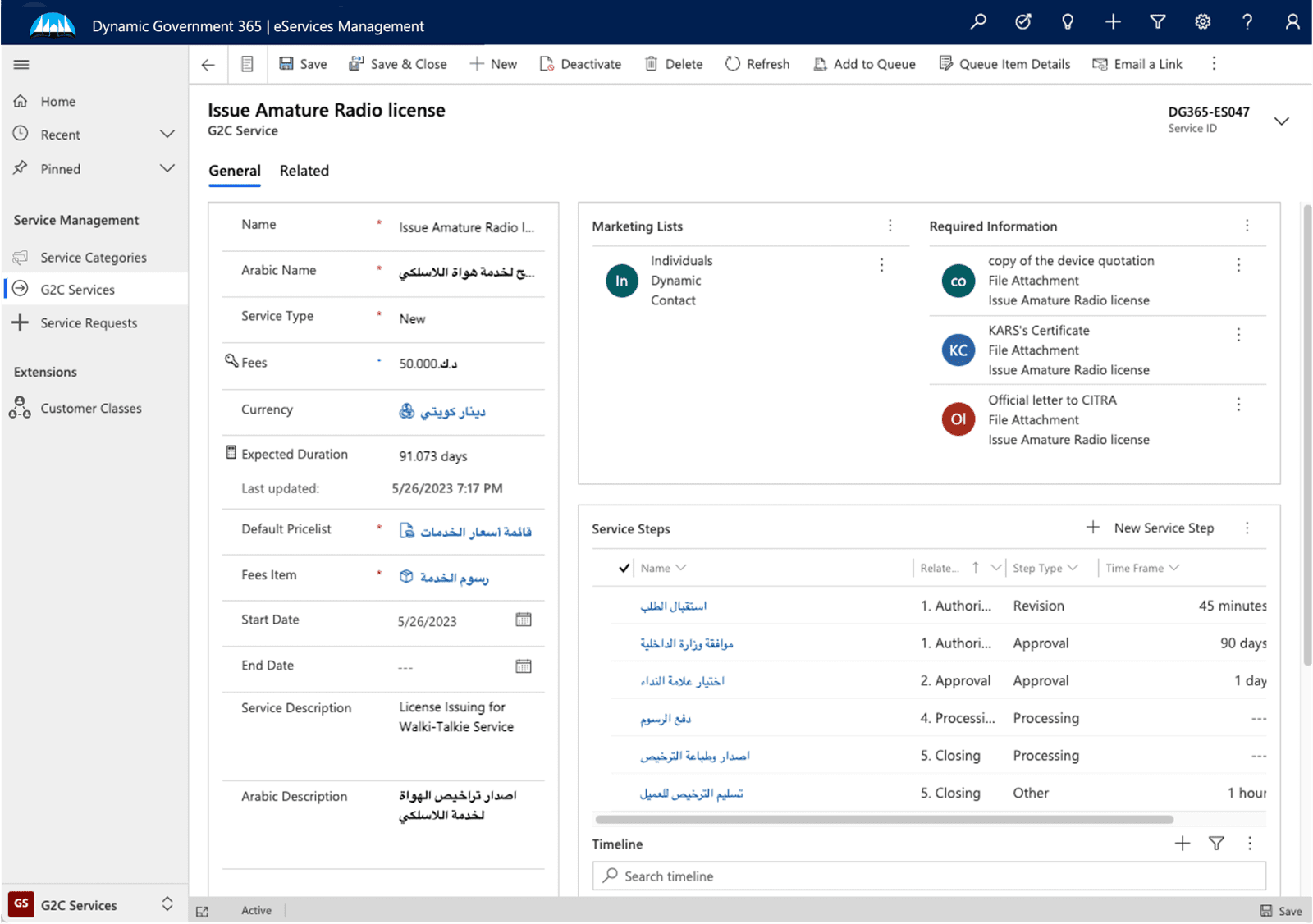
The catalog studio guides agencies as they automate service processes and workflows. Manual work and its cost go down, and every automated service stays in line with the relevant regulations and policies.
DG365 eServices integrates with contact center solutions and other communication channels, so agencies serve customers consistently across phone, email, chat and social media. Wait times fall, service is faster, and more access options mean higher satisfaction and fewer complaints.
Power BI connects to your data sources, builds visuals and delivers business intelligence quickly.
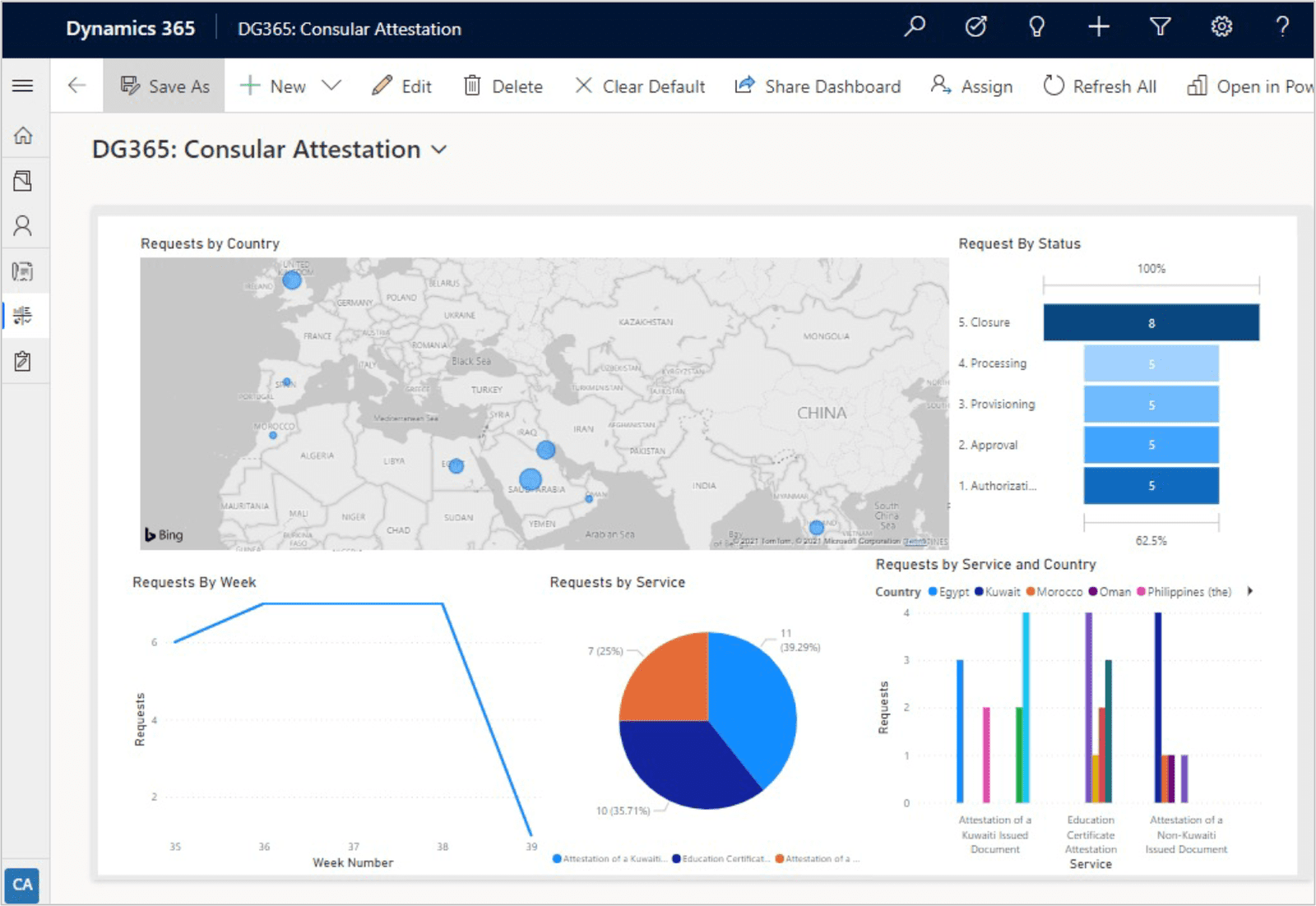
Live, secure analytics give managers the detail they need, down to individual records.
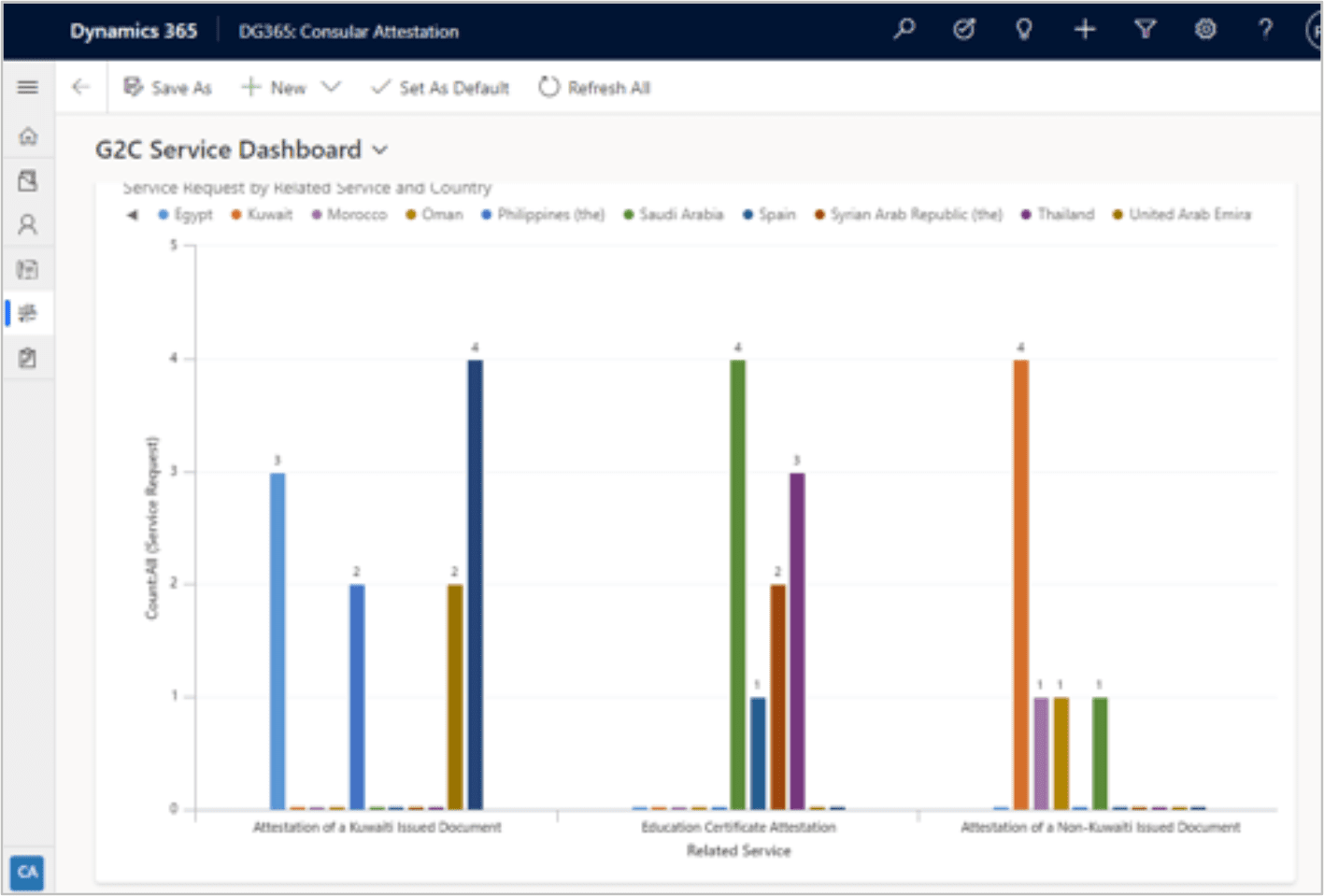
A secure, adaptable and user-friendly platform for government administrators and public consumers alike.
DG365 is a fully secured web application, and every xRM extension inherits the same protection.
Built on Dynamics, every xRM extension can be tailored to your business needs and growth plans.
Deploy the solution in the way that best fits your requirements and existing technology infrastructure.
Security and other sophisticated capabilities are already built in, so applications and extensions are delivered much faster than with traditional development.
Users already familiar with Dynamics adopt xRM applications easily, with no additional training effort.
Procurement officers, solution architects and leadership can pick the tier that fits their operational requirements and budget cycle.
For agencies launching their digital service transformation.
Everything in Foundation, plus multi-channel governance.
Everything in Advanced Governance, plus full AI.
| Feature / capability | Tier 1 Foundation | Tier 2 Adv. Governance | Tier 3 Enterprise Cognitive |
|---|---|---|---|
| Core platform | |||
| eService catalogue and studio | Yes | Yes | Yes |
| Citizen web portal (ASP.NET / Azure App Service) | Yes | Yes | Yes |
| ISO 9001-compliant service configuration | Yes | Yes | Yes |
| Bilingual UI (Arabic RTL + English) | Yes | Yes | Yes |
| WCAG / MADA accessibility compliance | Yes | Yes | Yes |
| Internal Dynamics back end (orchestration) | Yes | Yes | Yes |
| Process management and SLA monitoring | Yes | Yes | Yes |
| Azure API Management (Premium) | Yes | Yes | Yes |
| Azure Blob Storage for document offload | Yes | Yes | Yes |
| Microsoft Entra ID / zero trust security | Yes | Yes | Yes |
| Azure Key Vault (secrets management) | Yes | Yes | Yes |
| Identity and integration | |||
| Hawiyati (Kuwait Mobile ID) integration | Yes | Yes | Yes |
| Citizen mobile application (Flutter / React Native) | No | Yes | Yes |
| Basic internal system integrations (REST/OData) | No | Yes | Yes |
| SMS and WhatsApp citizen notifications | No | Yes | Yes |
| Push notifications (mobile) | No | Yes | Yes |
| Contact center / CRM integration | No | Yes | Yes |
| Artificial intelligence | |||
| Full Document AI (Azure AI Document Intelligence) | No | No | Yes |
| AI document ingestion and RAG classification | No | No | Yes |
| NLP semantic comprehension (LLM-powered) | No | No | Yes |
| Citizen AI helper (Copilot Studio chatbot) | No | No | Yes |
| AI-powered form population (RAG) | No | No | Yes |
| KG-ITS taxonomy auto-mapping | No | No | Yes |
| Anomaly detection and compliance flagging | No | No | Yes |
| Sahel App integration | No | No | Yes |
| Analytics and governance | |||
| Advanced reporting and Power BI dashboards | Yes | Yes | Yes |
| Real-time operational KPI monitoring | Yes | Yes | Yes |
| Immutable digital audit trails | Yes | Yes | Yes |
| FinOps / Azure Cost Management integration | No | Yes | Yes |
| Multi-environment support (Dev / Staging / Prod) | Yes | Yes | Yes |
✓ included · ✗ not available at this tier. Rows without marks are category headings.
Back-end service orchestration and case management.
Service performance analytics.

Portal hosting, API management, identity and AI services.
Citizen mobile app on Android.

Citizen mobile app on iPhone and iPad.
Launch citizen and business services on every channel, and extend them with Commercial Relationships Management for licensing and supplier services.