
Plan with evidence, not guesswork
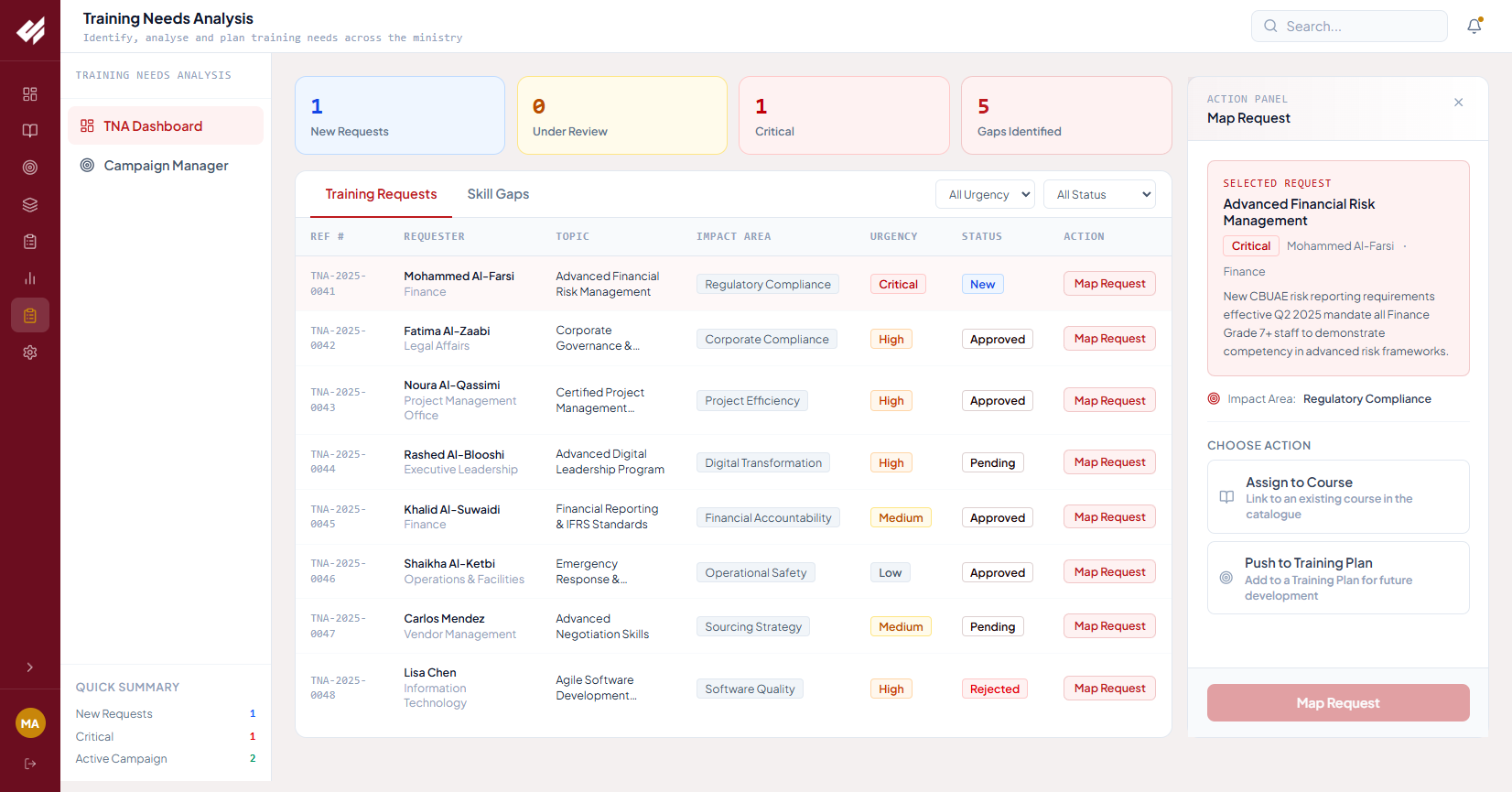
Training Needs Analysis captures departmental requests, grades urgency and exposes skill gaps that feed directly into the annual plan.
EduMAX · Employee Services (G2E)
One platform, 360° value. EduMAX carries every training requirement from the department that raises it through plan approval, vendor procurement, scheduling, verified attendance, assessment and certification, inside one auditable record. Engineered for government ministries, in Arabic and English.

EduMAX is an enterprise-grade, AI-driven training management system engineered for government ministries. It coordinates course catalogs, vendor bids, employee skill assessments and secure attendance on a single platform, so a requirement is tracked from the moment a department raises it to the day the certificate is issued and reported.
Every stage is built for the way public-sector training actually works: multi-level approvals, competing vendor proposals, mixed internal and external attendees, per-course budgets, accreditation and CPD tracking, and Arabic-first participants alongside English-language delivery.
The dashboard is the training manager's control room, scoped to the ministry and fiscal year. Four counters carry their own context, so a manager knows what needs attention before opening a single record.
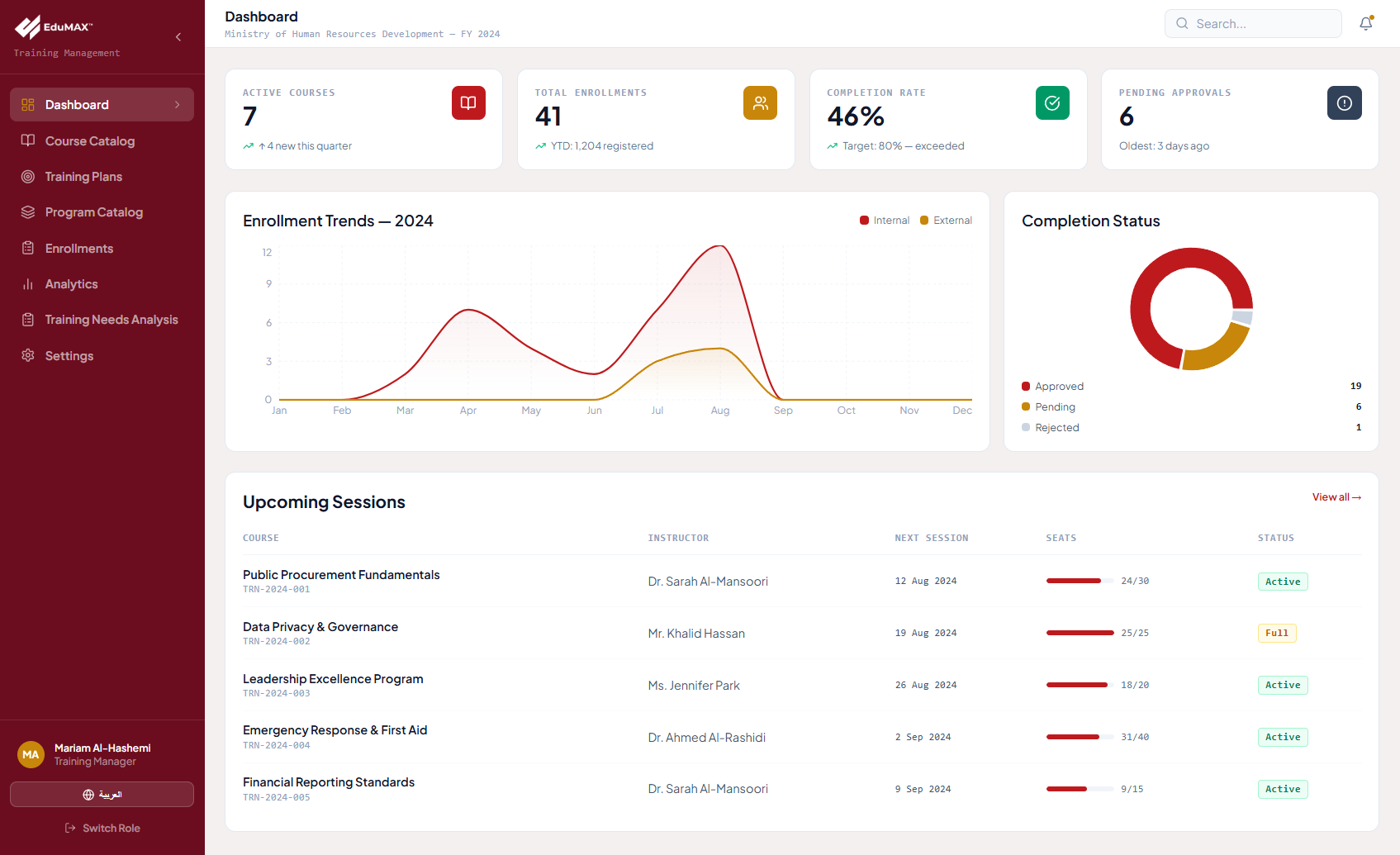
Nine modules serve one lifecycle: Dashboard, Course Catalog, Training Plans, Program Catalog, Enrollments, Attendance, Procurement and AI review, Analytics and Training Needs Analysis. Each stage hands its record to the next, so nothing is re-keyed and every decision stays traceable.
Departments raise training requests. Needs analysis grades urgency and exposes skill gaps.
Annual plans group courses, sessions and budget, then pass a four-stage approval chain.
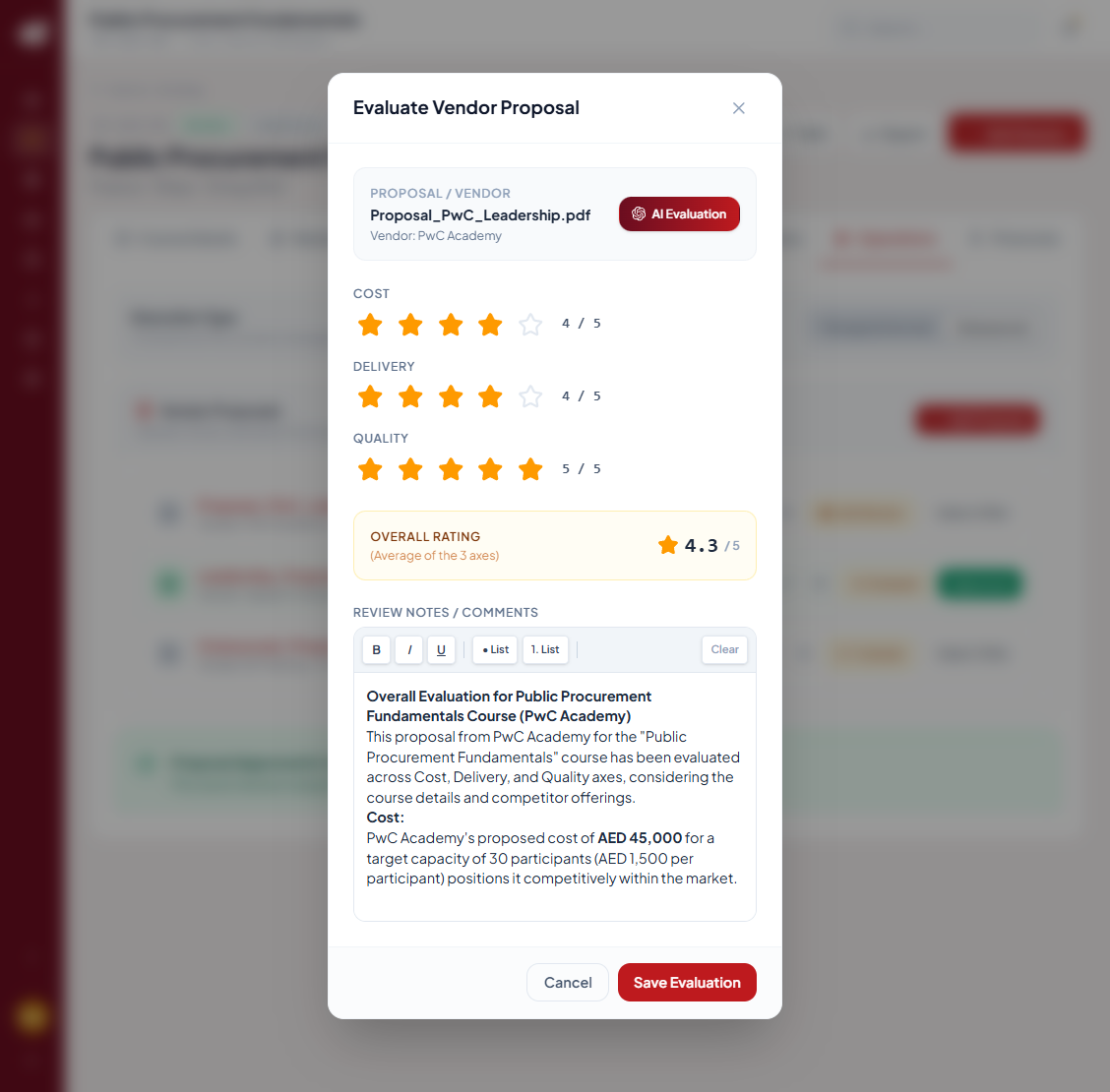
Proposals are scored on cost, delivery and quality and awarded with a written rationale.
Sessions run with a named instructor, an allocated venue and itemized delivery cost.
Civil ID and OTP self check-in feeds day-by-day registers and the 75% eligibility rule.
Eligible participants receive certificates, and fifteen standard reports close the loop.
Designed for ministries and federal entities running accredited internal training, mandatory compliance programs and open enrollment for external participants, under FAHR-aligned standards and CPD accreditation.
Training Needs Analysis captures departmental requests, grades urgency and exposes skill gaps that feed directly into the annual plan.
Vendor proposals are uploaded, scored on cost, delivery and quality, and awarded with a written rationale attached to the course file.
Venue, hotel, catering, materials, transport and instructor fees are itemized per course, so the budget line reflects total delivery cost.
Civil ID and OTP self check-in, day-by-day registers and a 75% eligibility rule turn attendance into certificate-grade evidence.
Separate workspaces for training managers, instructors, employees, external participants and approving directors, with one dataset behind them.
Fifteen standard reports across completion, compliance, performance, engagement, logistics and forecasting, each date-scoped and printable.
The EduMAX module map groups the platform into eight capability areas. Each one reads and writes the same record, from the course catalog to the kiosk on the training-room wall.
Catalog management, syllabus design, multi-tab course configuration and national ID integration.
Employee registry, competency mapping, progress tracking, assessments and role management.
Bidding campaigns, RFP management, AI proposal evaluation and contract values.
Secure QR check-in, rotating QR tokens, OTP authentication and facility allocation.
Gap identification, TNA campaigns, training requests and approval workflows.
Active course counts, completion rates, external attendee statistics and operational KPIs.
Multi-format handouts, a knowledge base, resource uploads and permission controls.
Trainer registry, specializations, venue capacity tracking and amenity management such as smart boards.
Embedded AI benchmarks vendor proposals, produces bilingual executive reports and gives employees always-on career advice.
An easy-to-use interface that supports the tools your people already know, blending learning management with CRM, productivity tools and mobile apps.
Omni-channel communication and social engagement keep learners, instructors and administrators connected.
An API-first microservices architecture connects with national databases and government identity providers.
From procurement to the training room, EduMAX replaces guesswork with data at every stage of the training lifecycle.
Vendor quality stops being a guess. EduMAX turns training procurement into an exact, data-driven process by automating evaluation and financial tracking.
Align your workforce with your organizational mission. Departments raise requests with a topic, an impact area and a justification, so every approval decision cites a stated reason.
Protect your training investment with enterprise-grade security protocols and well-run facilities.
Raw training data becomes strategic insight for leadership, without waiting for a manual report.
An AI Evaluation action reads the proposal alongside the course requirements and the competing offers, then drafts the review into an editable rich-text note that the reviewer can amend before saving.
Uploaded document and price
Objectives, capacity and language
Every other bid on the course
The benchmark for total price
Three axes, averaged out of five
With per-participant cost analysis
Reports in English and Arabic
Written rationale for the award
The reviewer stays in control. Scores and notes can be amended before saving, and the cheapest offer is not automatically the chosen one.
The planning and procurement modules give every budget line an approval trail and every award a written justification.
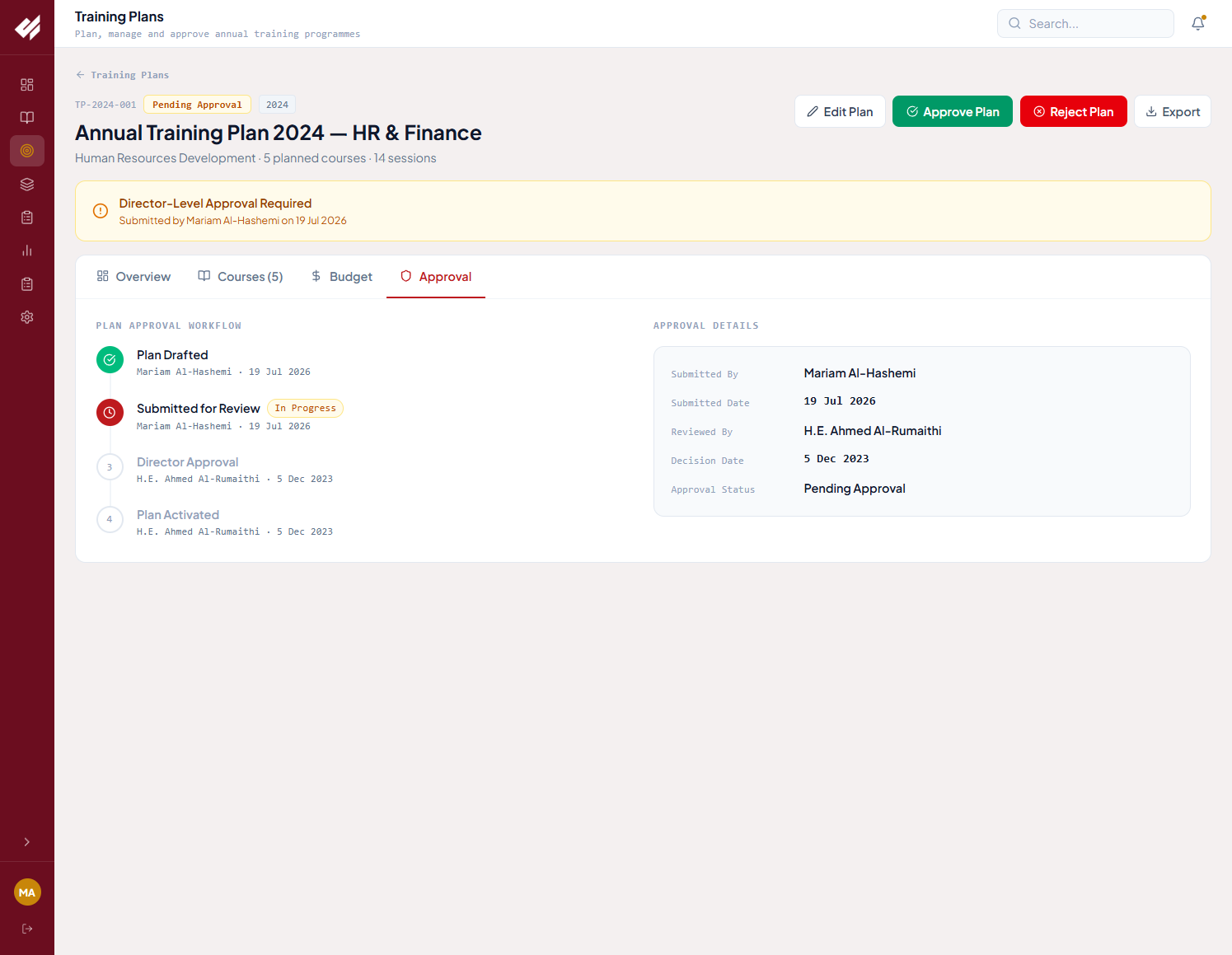
A plan groups the year's courses for a department, each with planned attendees, session count, duration and budget. The approval tab names the officer and date at every step and highlights the pending stage while it waits.
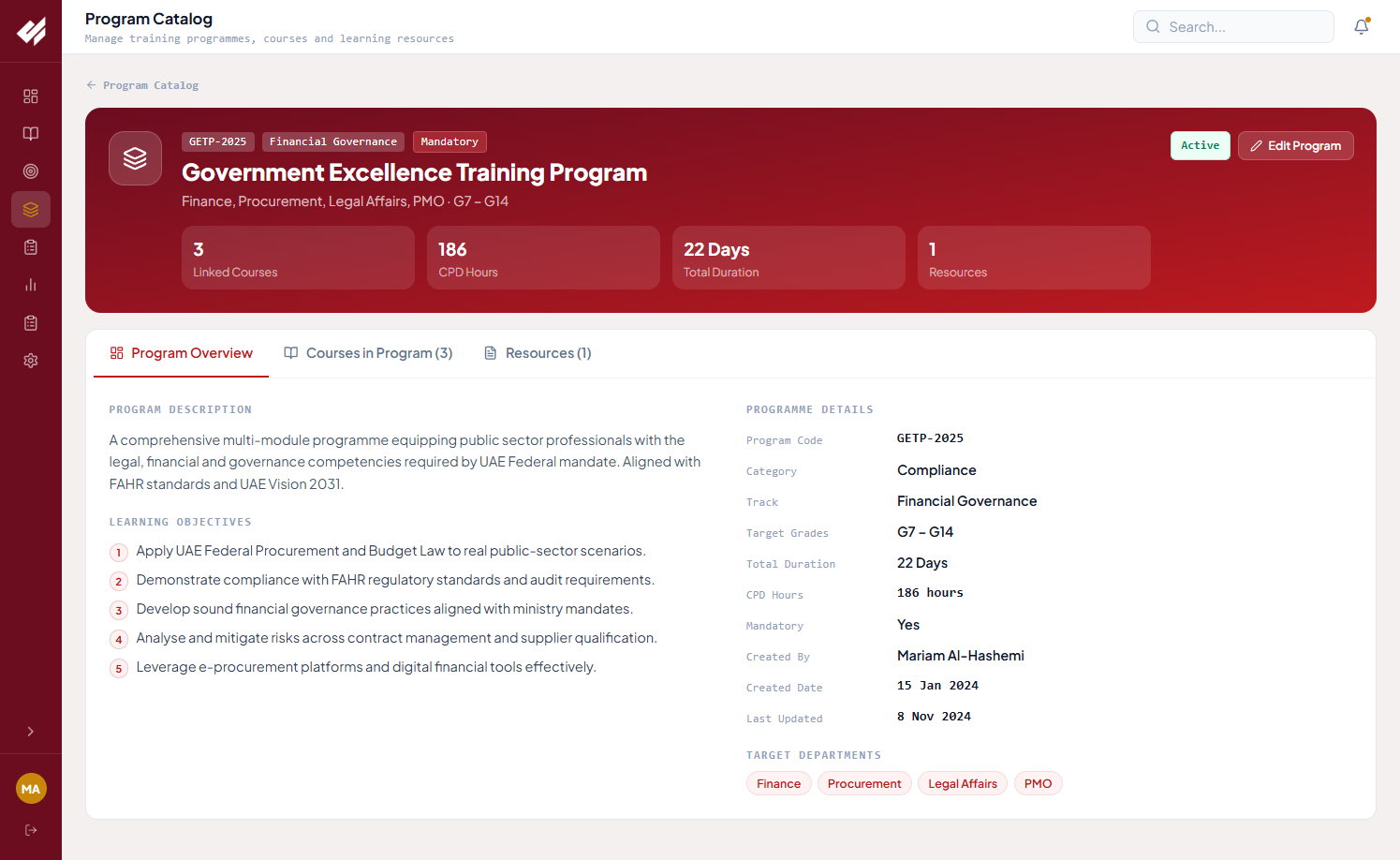
Programs bundle related courses into a governed curriculum: a program code, category and track, target grade bands, total duration, accumulated CPD hours, a mandatory flag, target departments, stated learning objectives and attached resources, with authorship and last-updated dates on the record.
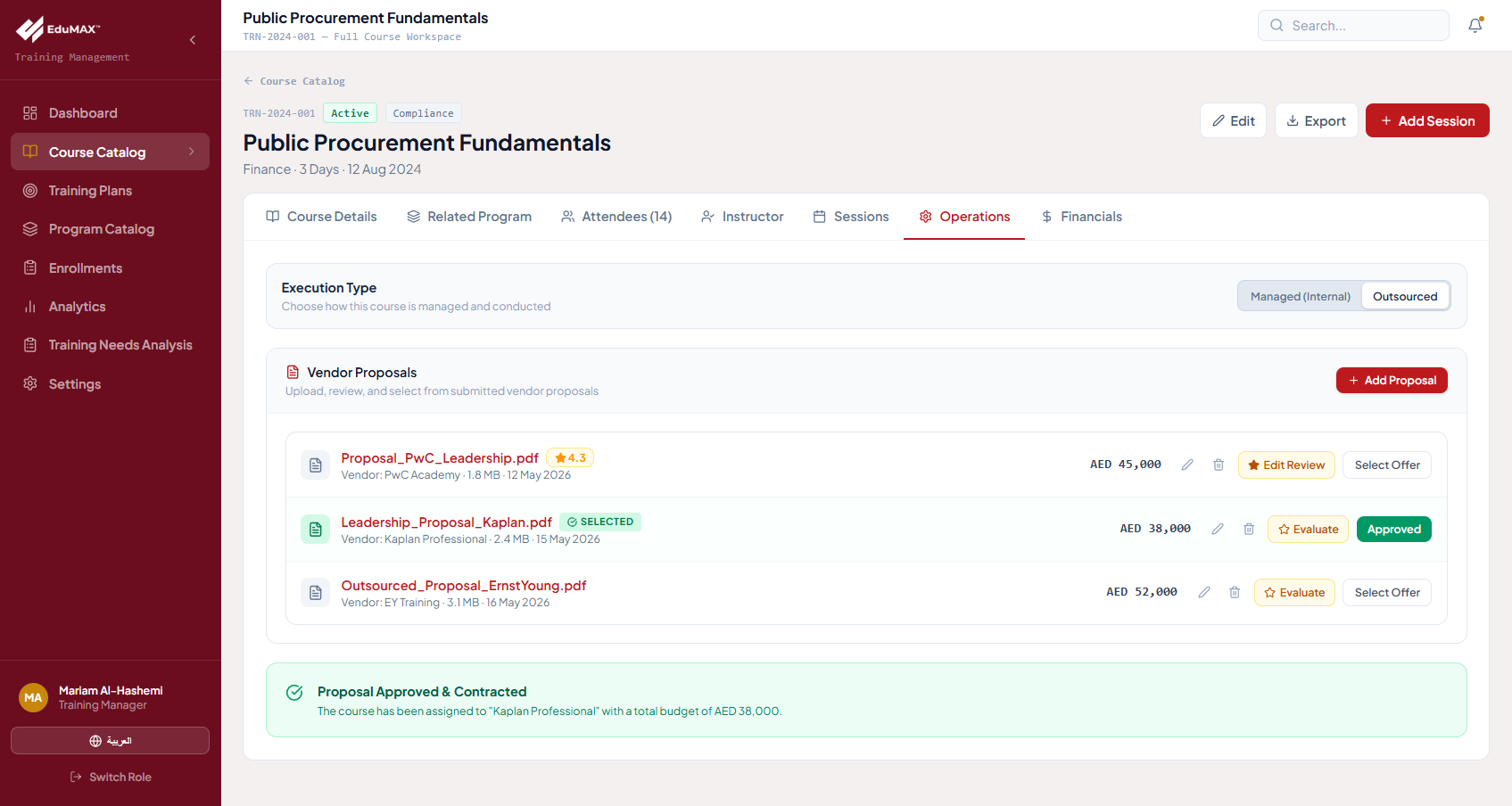
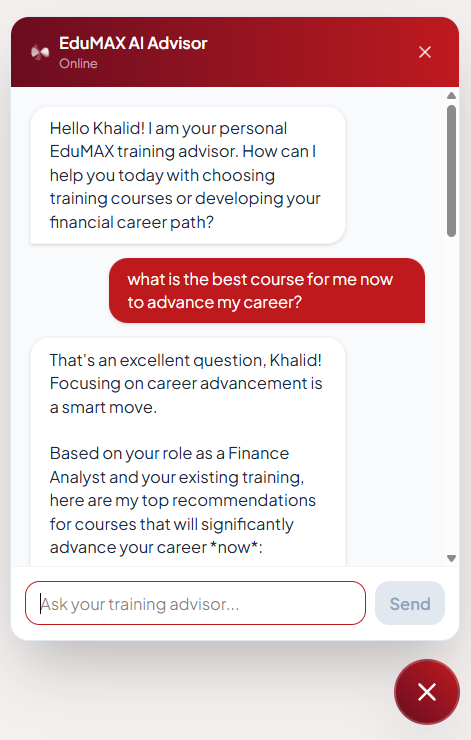
A course is either managed internally or outsourced. Choosing outsourced opens a proposal register: each vendor document is uploaded with its price, reviewed, scored, and either selected or left on file. Once awarded, the course header states the vendor and contracted budget.
Delivery logistics are itemized, not estimated. Each cost line carries a rate, a quantity and a subtotal, and internal venues are correctly recorded at zero external cost.
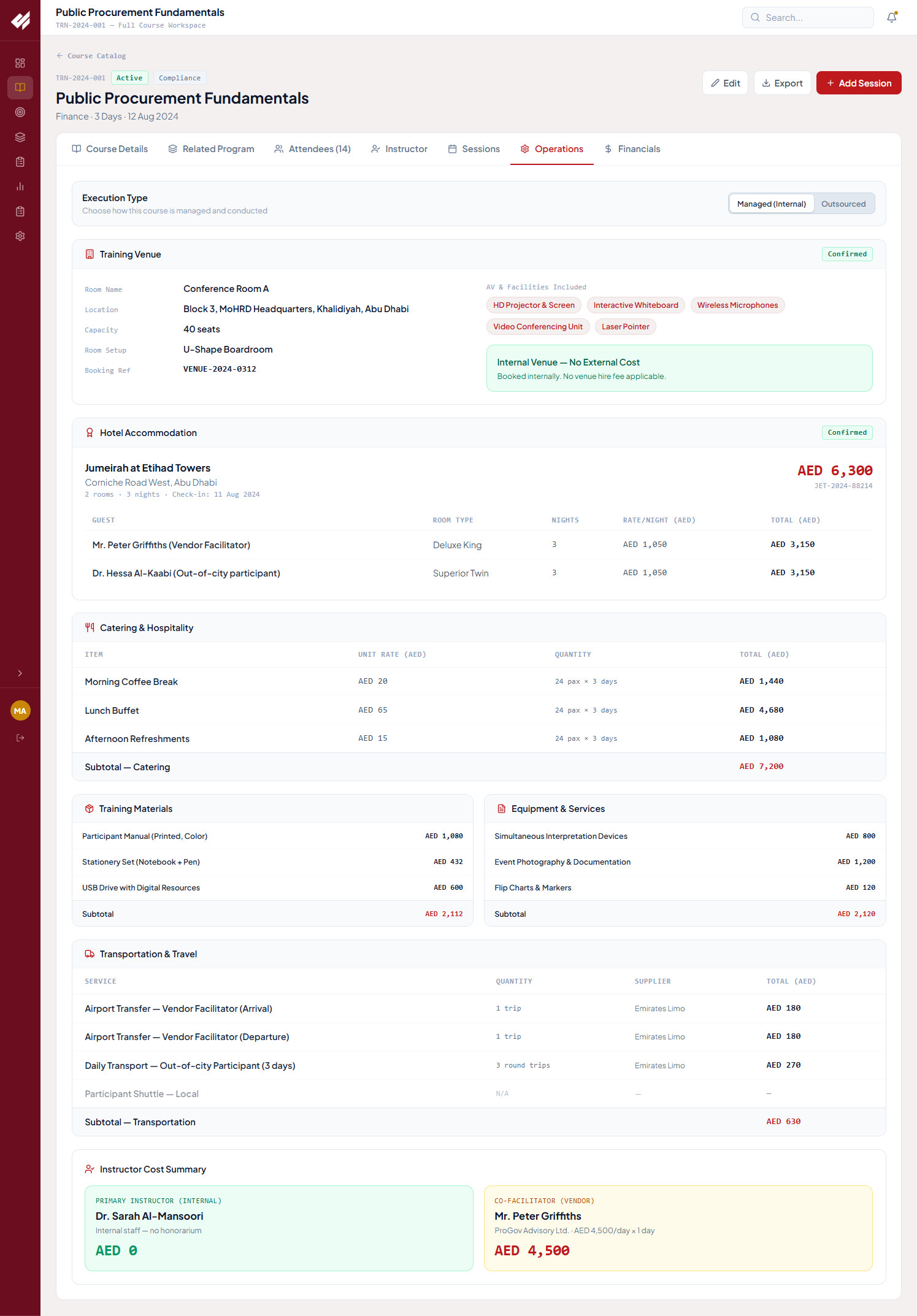
The EduMAX AI Advisor is a chat assistant embedded in the trainee portal. It guides employees to the most relevant courses based on their organizational role and their department's skill gaps, so personalized coaching scales across the entire institution.
The same embedded AI reduces administrative overhead for the training unit.
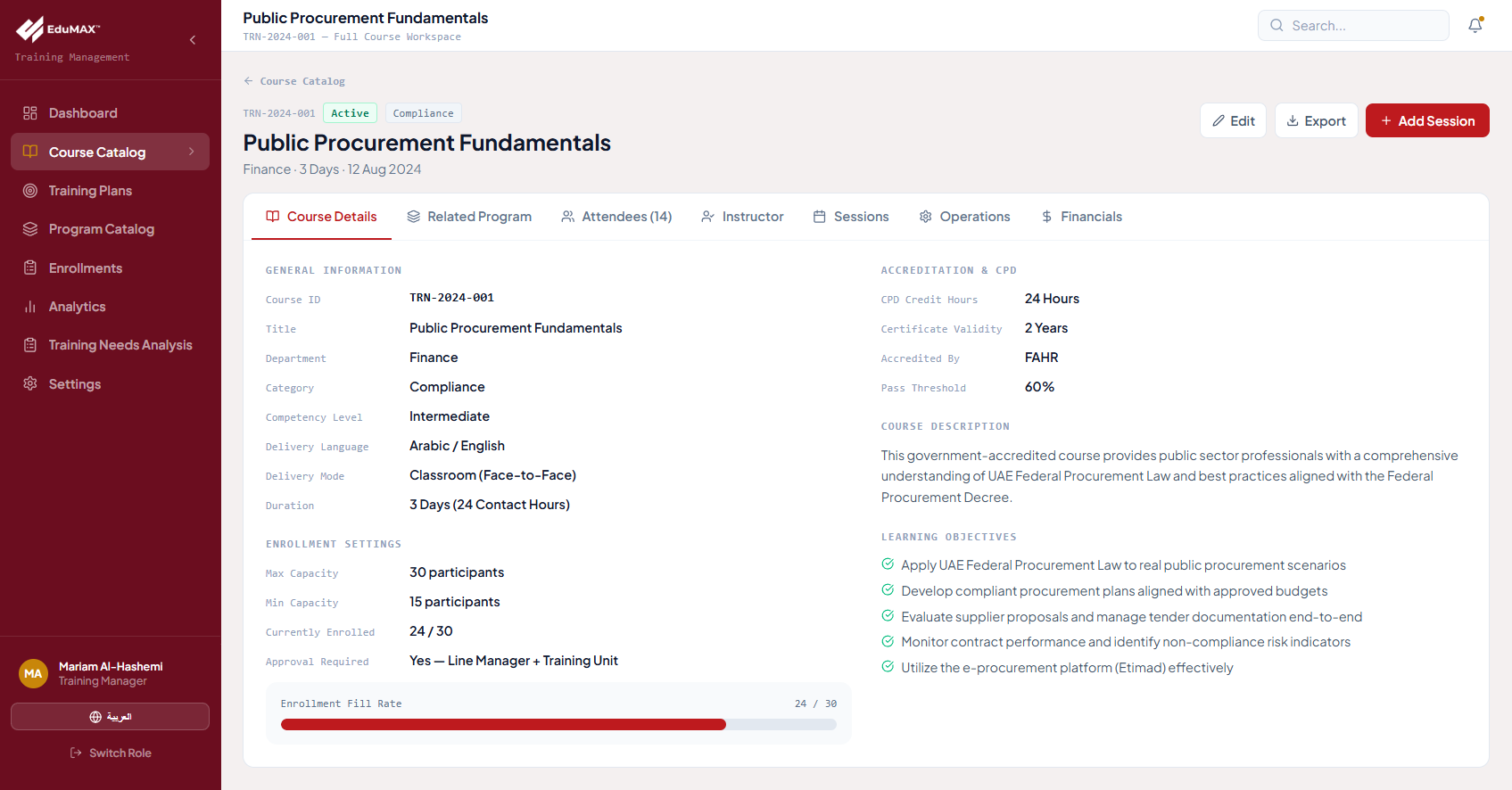
Course, enrollment and attendance modules share one roster, so the register that proves attendance is the same record that issues the certificate.
Details, related program, attendees, instructor, sessions, operations and financials sit in one course workspace. Accreditation sits beside enrollment settings, so a manager can confirm CPD hours, certificate validity and pass threshold at the same moment they check remaining capacity.
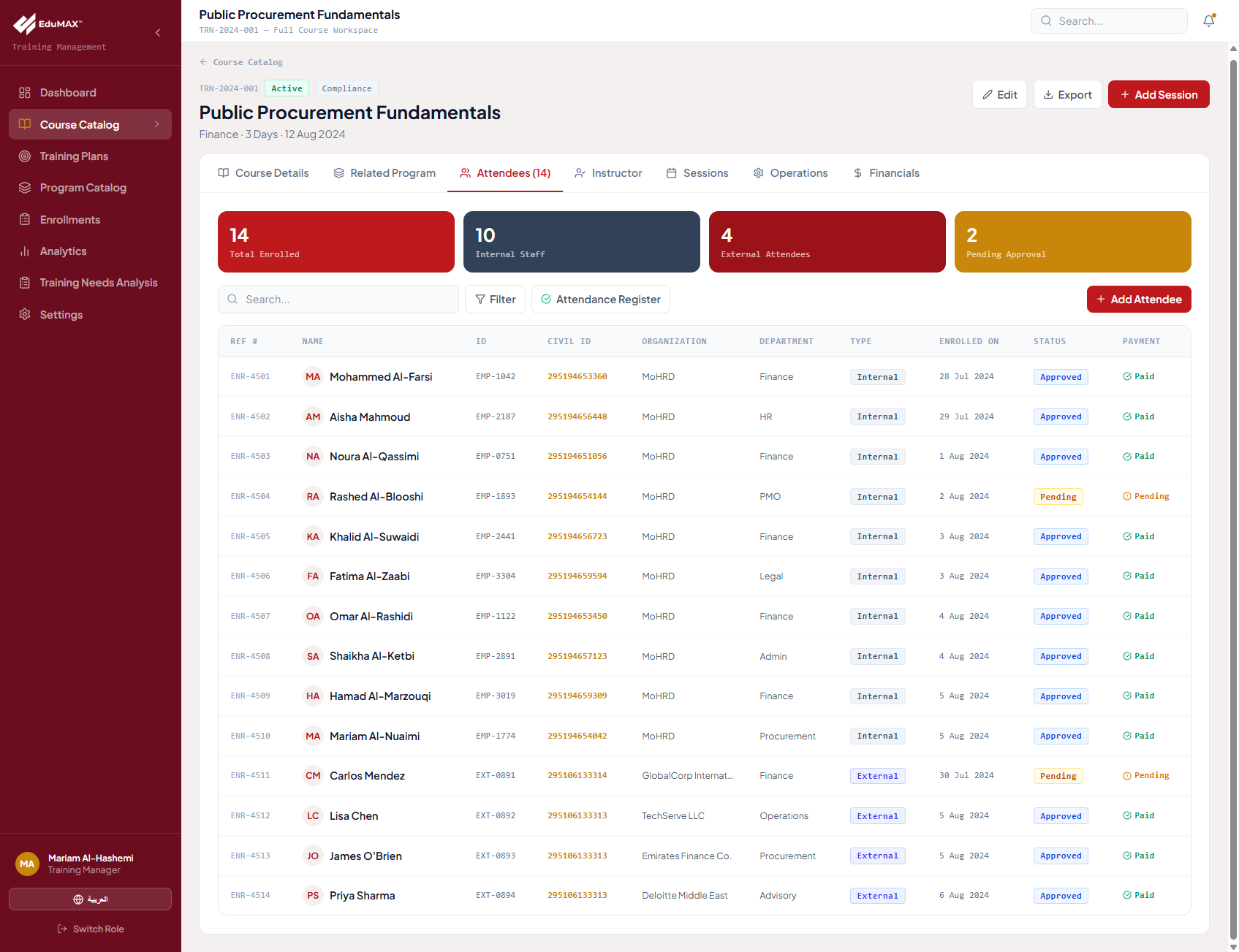
Each attendee row carries an enrollment reference, employee or external ID, Civil ID, organization, department, audience type, enrollment date, approval status and payment state. Counters above the table separate total enrolled, internal staff, external attendees and those still awaiting approval.
Sessions are listed by reference and status. Inside a session, one column per training day lets an administrator cycle each cell through its states, with bulk mark-all actions and department filtering. Totals, percentages and certificate eligibility recalculate as marks are saved.
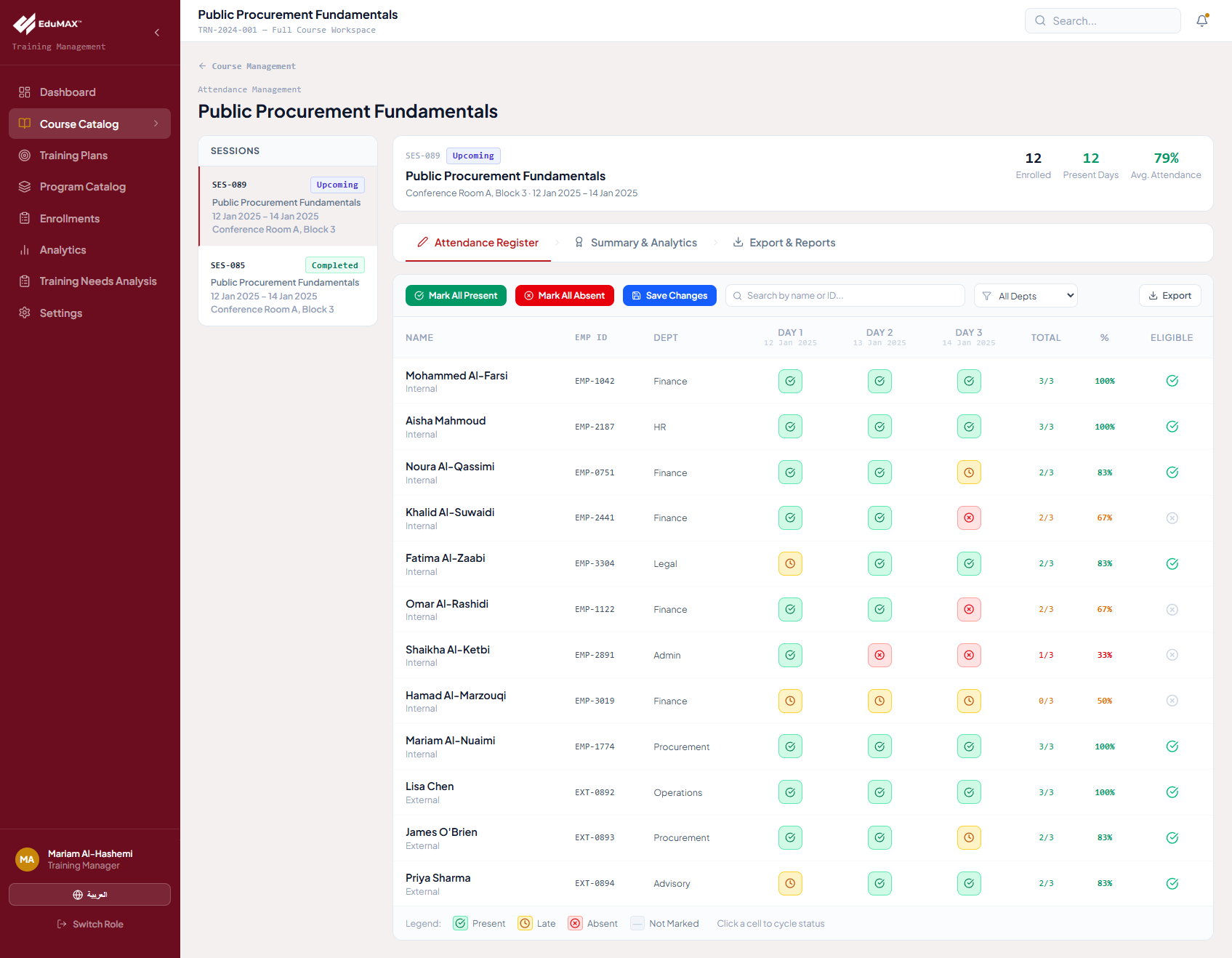
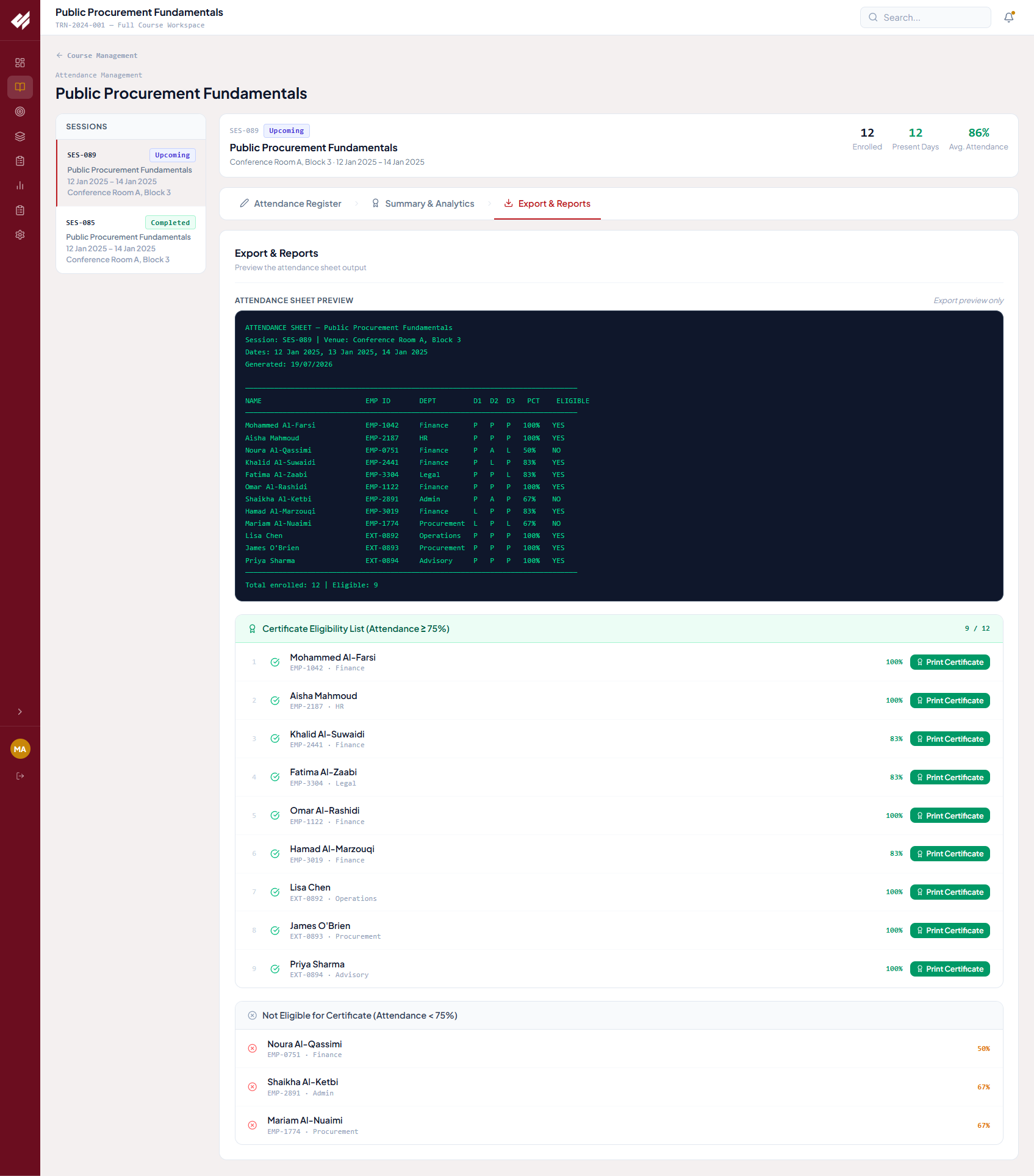
Attendance summarizes itself by day and by department. The export tab then produces a formatted attendance sheet and splits the cohort into eligible and non-eligible lists, ready for certificate printing.
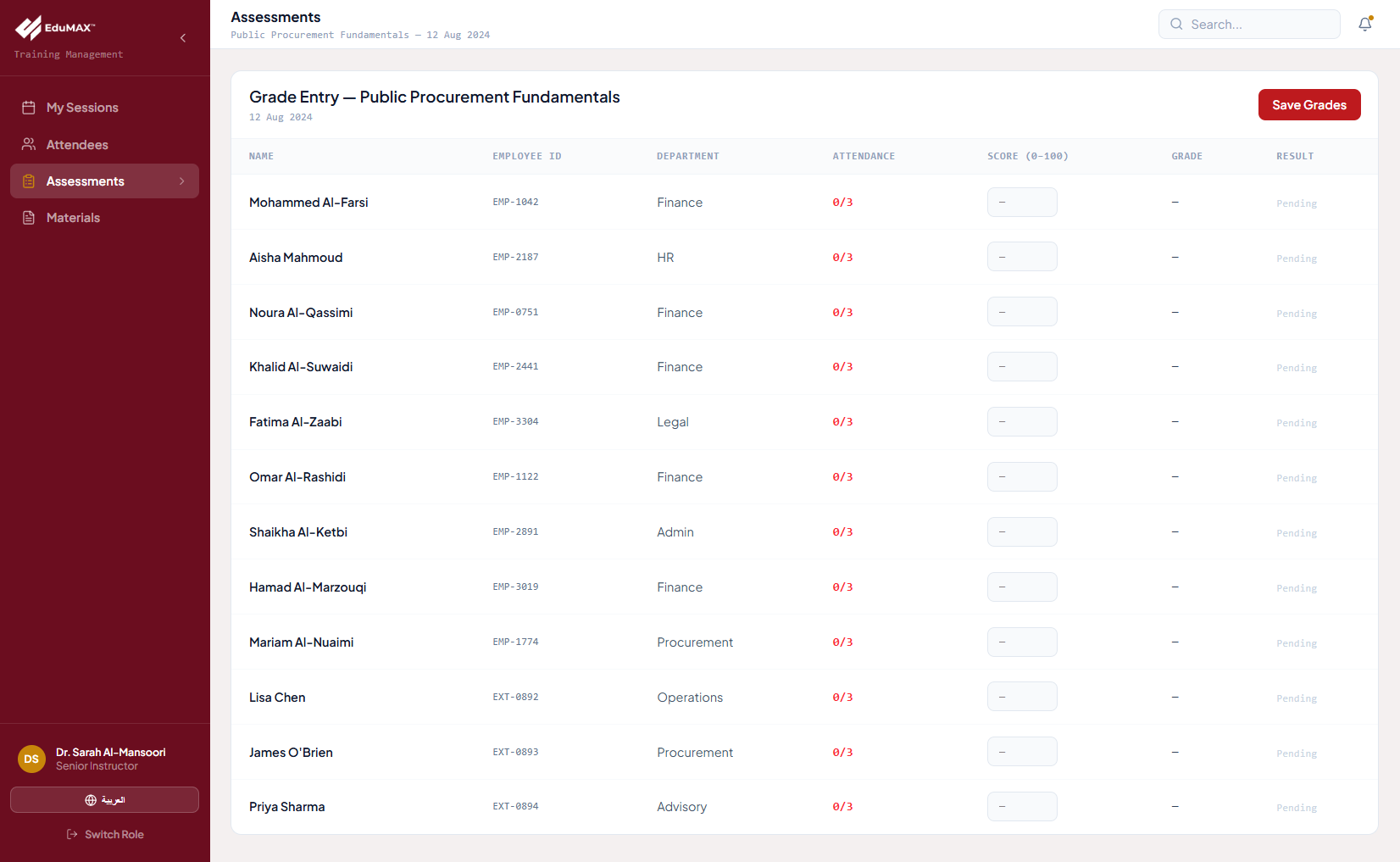
Instructors get their own schedule, satisfaction score and a grade-entry sheet that shows attendance beside each score before results are saved. Employees browse the catalog with live seat counts, track their plan and scores, and collect certificates.
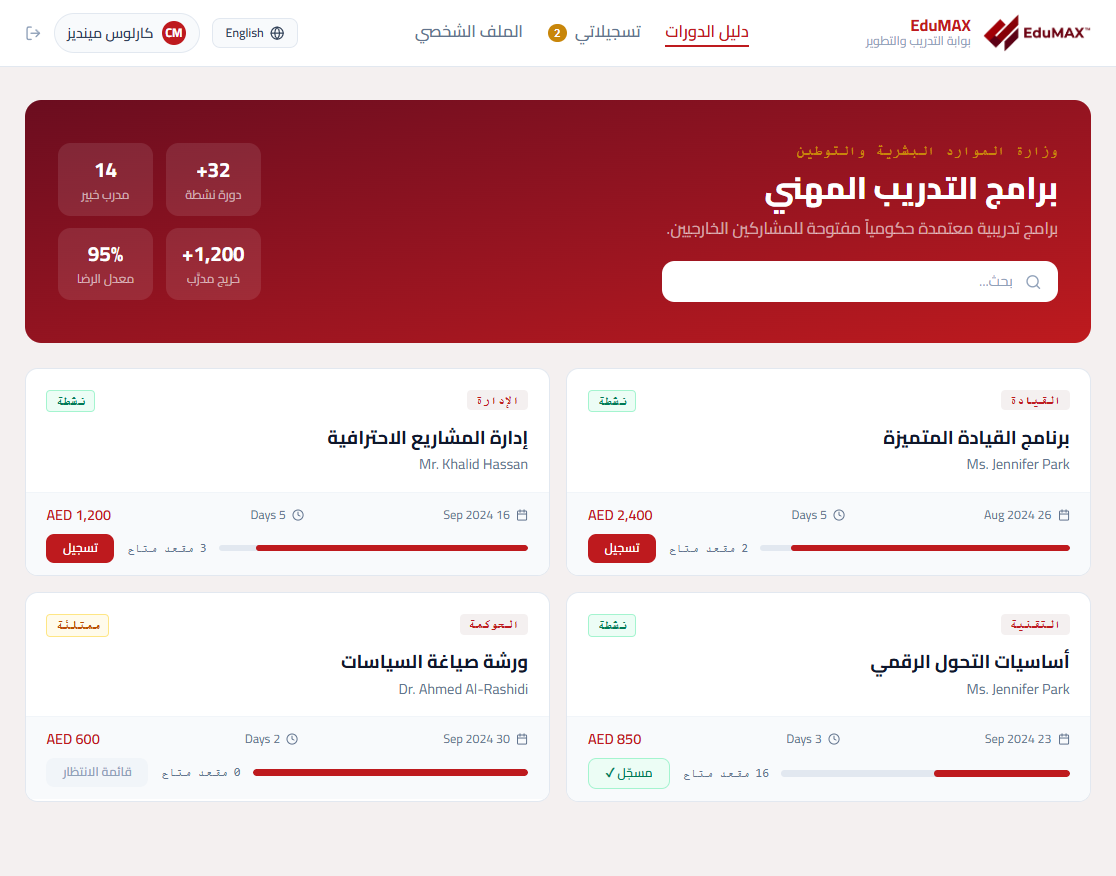
External participants use a fully right-to-left Arabic portal that lists accredited government programs with price, duration, dates, instructor and remaining seats. They can register, join a waiting list, or see that they are already enrolled.
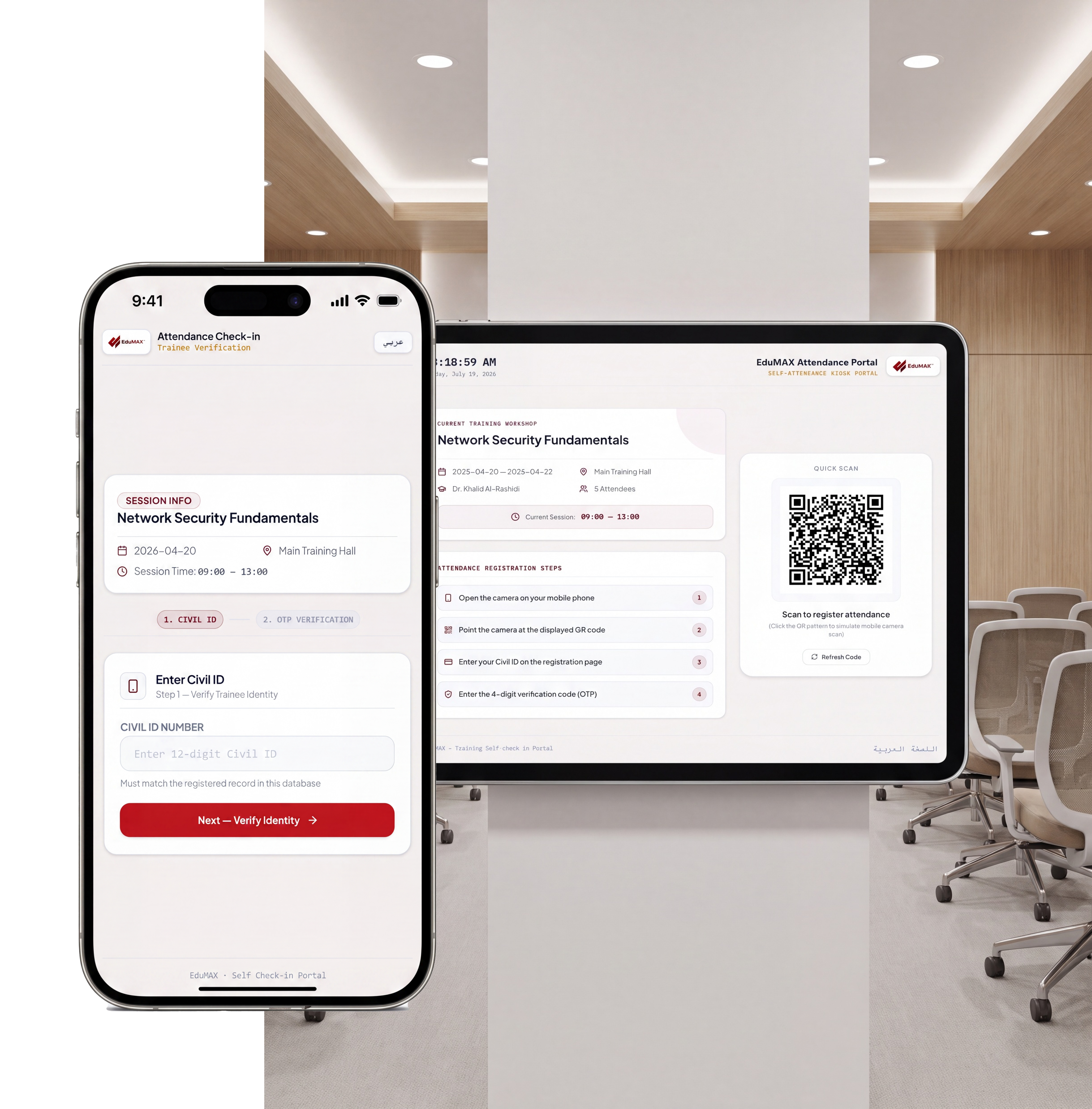
A kiosk on site displays a QR code that rotates every minute. The participant's own phone, Civil ID and a one-time code do the rest.
The code refreshes on the session screen, so it cannot be reused off site.
Twelve digits, matched against the registered enrollment record.
A four-digit verification code proves the person, not just the device.
The mark lands in the session register and updates certificate eligibility instantly.
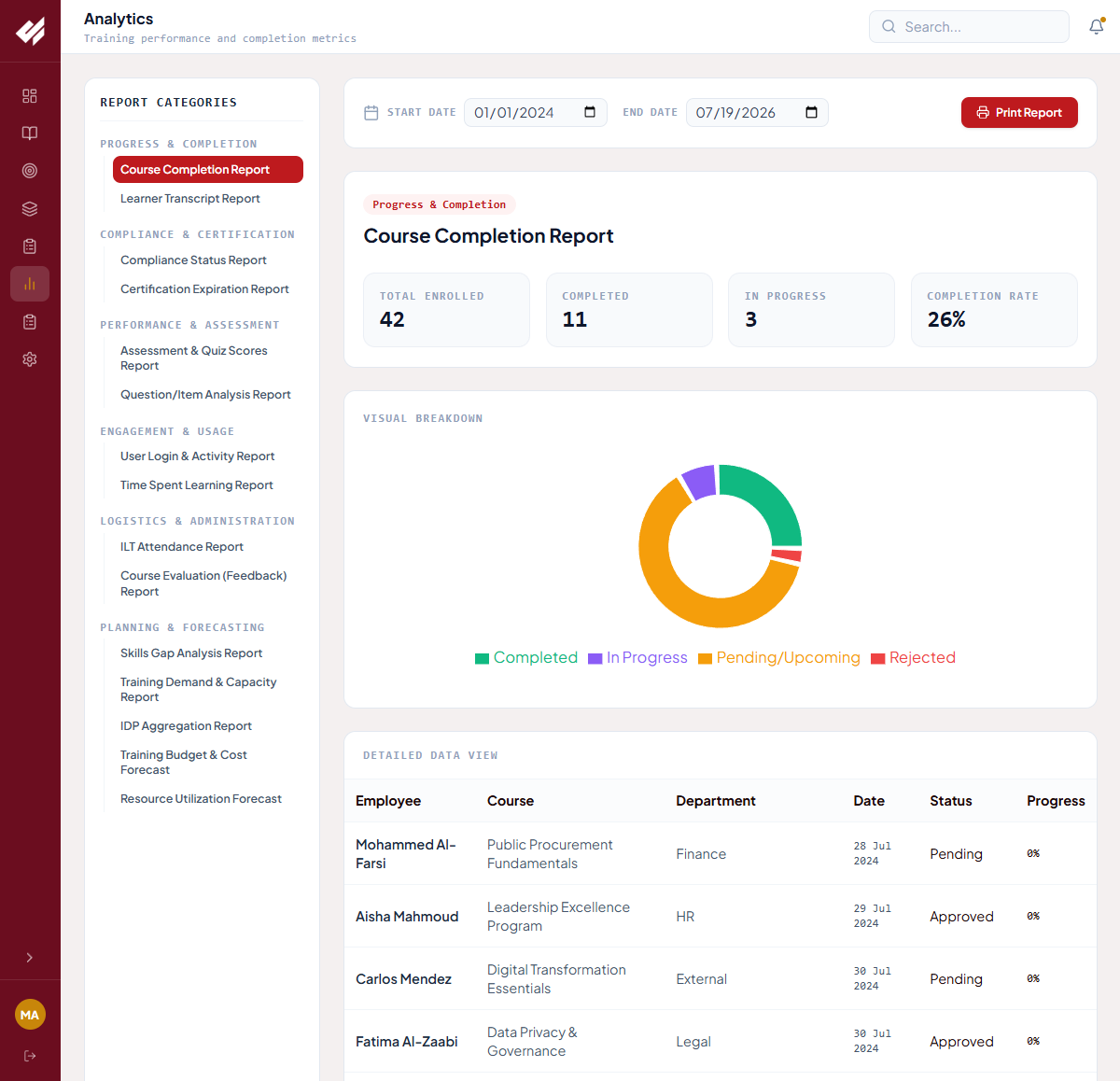
Every report is date-scoped, summarized in headline figures, charted and backed by the underlying data table, then printed straight from the page for committee packs.
EduMAX runs on a permission-driven architecture governed by dynamic system profiles. Every stakeholder gets the tools they need, approving directors included, while the organization keeps strict control over its data.
Strategic oversight and operational control for L&D administrators and executive management. Manage the full training catalog, review enrollments, configure sessions and view analytics, along with vendor contracts, budgets and performance metrics.
Focused delivery and classroom logistics for instructors and facilitators. Access assigned sessions, manage attendance, enter assessment scores, upload materials and see facility allocations.
Frictionless learning and career progression for employees and trainees. Browse the training catalog, self-enroll in programs, receive AI-driven recommendations, track learning and download certificates.
Discover open enrollment programs, register as an external participant and manage registrations through the public portal.
The instructor's navigation is sessions, attendees, assessments and materials. The trainee's is browse, my learning and certificates. One dataset sits behind every view.
| Capability | Training manager | Director | Instructor | Employee | External |
|---|---|---|---|---|---|
| Create and edit courses, sessions and programs | Full access | Scoped or read-only | Not available | Not available | Not available |
| Approve annual training plans | Scoped or read-only | Full access | Not available | Not available | Not available |
| Manage vendor proposals and awards | Full access | Scoped or read-only | Not available | Not available | Not available |
| Approve enrollment requests | Full access | Scoped or read-only | Not available | Not available | Not available |
| Mark attendance | Full access | Not available | Full access | Scoped or read-only | Scoped or read-only |
| Enter grades and assessment results | Scoped or read-only | Not available | Full access | Not available | Not available |
| Issue and print certificates | Full access | Not available | Scoped or read-only | Scoped or read-only | Scoped or read-only |
| Raise training needs requests | Full access | Full access | Scoped or read-only | Full access | Not available |
| Browse catalog and self-enroll | Full access | Full access | Full access | Full access | Full access |
| Run analytics and export reports | Full access | Full access | Scoped or read-only | Not available | Not available |
Permissions are indicative and configurable during implementation.
A complete, 360-degree training management solution on a single platform, built for Microsoft Dynamics 365.
A built-in course catalog with skill-set management that captures vital business information for every program.
Complex scheduling and enrollment with wait-listing and facility booking, consolidating access and analytics for every course and session run.
Employees request enrollment in the programs they choose, submit training needs and provide feedback, on web and mobile self-service apps.
Builds the applications, assessments and online surveys that feed the system automatically and help assemble a combined TNA.
Analysis and BI dashboards covering all training operations and activities.
Dedicated access for training service managers and administrators.
A tablet kiosk and mobile self check-in bring verified attendance to the training room.
System interfaces for integrating and exchanging information with other software.
EduMAX turns organizational learning from a reactive administrative task into a proactive, intelligence-powered strategic asset.
| Strategic objective | EduMAX capability | Measurable business impact |
|---|---|---|
| Budget optimization | AI-assisted vendor proposal evaluation | Reduces evaluation time by 80% and removes bias, so the highest-quality training is procured at the best price. |
| Workforce alignment | Training Needs Analysis (TNA) module | Maps directly to departmental KPIs, so every dollar spent closes a documented skill gap. |
| Risk mitigation | Secure QR and Civil ID integration kiosks | Eliminates attendance fraud and ghost enrollments, ensuring 100% compliance and audit-readiness. |
| Operational efficiency | Automated facility and instructor allocation | Eradicates scheduling conflicts and maximizes the utilization of premium physical assets such as smart boards and AV systems. |
Start with training operations and add planning, procurement and ministry-scale capabilities as your mandate grows.
For entities standardizing catalog, enrollment and attendance.
Adds annual planning, vendor sourcing and full cost control.
For ministry-wide rollout with external enrollment and needs analysis.
Built on a secure, cloud-native Microsoft Azure foundation, EduMAX digitizes, automates and manages complex training operations. Every channel enters through one API gateway. See Azure and AI integration for the platform view.
Administration portals, trainer access, self-service access, mobile attendance and external integration.
Azure API Management authenticates, protects and routes every request.
ASP.NET application logic and the EduMAX core engine, with Microsoft Power Platform for business process flows, the SLA engine, approvals and security roles on a Dynamics 365 application host.
Azure OpenAI for language intelligence, AI Document Intelligence for OCR and entity extraction, and AI Search for semantic search.
Document storage in Azure Blob Storage and an archive store with hierarchical namespace in Azure Data Lake Gen2.
Conditional access and zero trust through Microsoft Entra ID, log analysis and audit in Azure Monitor, and vulnerability assessment in Defender for Cloud.
Scalability, high availability and integration with government identity providers such as Microsoft Entra ID.
End-to-end encryption, immutable audit trails and strict role-based access control (RBAC) with scoped visibility per workspace.
Azure AI services are embedded natively. Azure OpenAI processes documents through a secure private endpoint, without compromising data sovereignty.
An API-first microservices architecture allows rapid AI feature deployment and integration with national databases such as the Kuwaiti Civil ID, without downtime.
Civil ID and OTP verification for attendance evidence, certificate eligibility enforced by rule, and multi-stage approval trails naming officer and date at each step.
Data residency and retention are configured to the entity's policy, and deployment parameters are confirmed against its own infrastructure and information-security policy.
| Specification | EduMAX |
|---|---|
| Delivery model | Government private cloud, entity-hosted or on-premise |
| Client | Browser-based, with no desktop install |
| Devices | Desktop, tablet kiosk and mobile self check-in |
| Languages | Arabic (right-to-left) and English, switchable in session |
| Authentication | SSO and federated identity, plus OTP for verification flows |
| Currency | Configurable |
| Accreditation model | CPD hours, accrediting body, certificate validity and pass threshold |
| Exports | Printable reports, attendance sheets, certificates, and course and plan exports |
| Standard reports | 15 across 6 categories, date-scoped |
| AI services | Vendor proposal evaluation, learner advisor, and skill-gap and demand analysis |
| Implementation | Configuration of roles, approval chains, categories and accreditation rules |
Deployment, integration and security parameters are confirmed during scoping against the entity's own infrastructure and information-security policy.
Employee ID, grade, department and line manager for enrollment and approval routing.
Human Resources ManagementFederated sign-in for ministry staff, with OTP verification for kiosk and external users.
Course and plan budgets, vendor awards and itemized delivery cost.
Vendor records and awarded contracts aligned to the entity's tendering platform.
Government ProcurementEmail and SMS for approvals, enrollment confirmation and OTP delivery.
Vendor proposals, learning resources and generated certificates.
EduMAX is deliberately engineered to maximize the strategic Microsoft investments your ministry already holds.
Eliminates third-party tool costs by using existing Microsoft 365 and Azure enterprise agreements.
All platform data, including AI model inference, runs exclusively within the Azure Kuwait region.
Platform-managed AES-256 encryption aligns strictly with Kuwait's national cloud and cybersecurity policies.
A tour of the administrator, instructor, trainee, external portal and kiosk experiences.

Cloud-native foundation with Azure API Management, Microsoft Entra ID and Azure OpenAI.
EduMAX is built for Microsoft Dynamics 365, with Power Platform handling process flows, approvals and security roles.
Analytical dashboards for training operations and activities.
See how EduMAX can plan with evidence, automate vendor evaluation, close skill gaps and prove attendance across your ministry. Pair it with Human Resources Management for a complete employee lifecycle.